artofrf.com

Ali's Technology Blog

Menu
  • Home
  • Important Links
  • About Me
  • Tools and Scripts
Menu

Disabling 802.11ax(Wi-Fi6) Ruckus APs/vSZ

Posted on June 3, 2020June 3, 2020 by mali

Wi-Fi6/802.11ax is a newer standard in Wi-Fi, providing higher data rates, increase capacity, power efficiency. However, in a typical environment, there are not many Wi-Fi6/802.11ax clients just yet. With that being said, there may be times when we need to disable Wi-Fi6/802.11ax.

I have two Wi-Fi6 access points in my home lab Ruckus R730 and R750 and using Ruckus vSZ-H for the management of these access points. I wanted to see if I can simply turn off Wi-Fi6/802.11ax on an SSID. Going through the SSID options in the vSZ-H I did not see any option/ability to turn off Wi-Fi6/802.11ax. Similarly, under the access point settings, I did not see any option/ability to turn off Wi-Fi6/802.11ax.

Then I started to look at the command line of the access point and found the following commands:

get wlanlist [Let's you find out the list of WLANs]
get mode WIFI-Name [Tells the the mode WLAN is using]
set mode WIFI-Name "desired-mode" [Let's you configure desired mode]

Before you can find the mode of a specific SSID and/or set it, you have to find out the associated “wlan##”. This can be achieved by using the command “get wlanlist” command. It will give you the following output:

wlan33 = SSID “ruckus-dual”

Looking at the list above I can find out that my SSID (ruckus-dual) maps to wlan33 in the access point. Now using the command shown below I can find out the mode that SSID is using. Wi-Fi Explorer Pro shows HE IE’s in the frames.
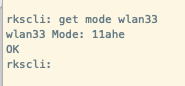
Finding out the SSID Mode
“get mode wlan33”

Next, I needed to set that radio to Wi-Fi5/802.11ac mode. This can be accomplished directly from the access point or the vSZ-H CLI. The screen shot below shows different modes that are supported and can be set. After setting the mode to Wi-Fi5/802.11ac “get” command confirms that the new mode is “11ac”.

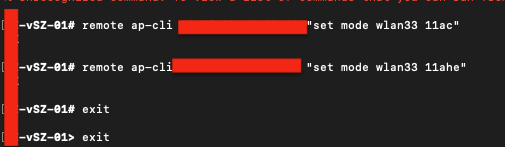
Setting SSID mode to Wi-Fi5/802.11ac
“set mode wlan33 11ac”

Next I fired up Wi-Fi Explorer Pro to confirm if the HE IE’s were still present or not. Capture below shows only HT (802.11n/Wi-Fi4) and VHT (802.11ac/Wi-Fi5) IE’s were present.

Wi-Fi Explorer Pro showing only HT and VHT IE’s.

NOTE: As of this writing and vSZ-H version 5.2.0.0.699. I have not been able to find out a way to disable Wi-Fi6 from the UI. If there is something I may have missed please feel free to contact me via the comment section and/or twitter @malief46. Thank you.

Category: Ruckus, Ruckus Wireless

Leave a Reply Cancel reply

Your email address will not be published. Required fields are marked *

This site uses Akismet to reduce spam. Learn how your comment data is processed.

Recent Posts

  • Nile Secure Guest – Configuration and Use Case
  • WLAN Pros Toolbox
  • Nile does NAC – Configuring Trust Engine
  • WLAN Validator
  • PCAP I/O Graph Analyzer

Tags

AirDrop arista Arista AGNI Arista CV-CUE Arista NAC Arista WIPS Arista WPA3 UPSK Aruba Central Automating Mist Switch Templates Automation AWDL Configuring Switch Templates in Mist CWAP 403 EAP Format MAC Addresses Hamina Network Planner Juniper SRX300 MacBook Marvis mdns MFD8 MFD9 Mist Access Assurance MistAI Mist Auto Placement Mist MPSK Mist Wireless NaaS Networking Field Day NFD32 NileNav Nile Secure Nile Wi-Fi Social Channels Tech Field Day Troubleshooting with Marvis Troubleshooting with Mist Troubleshooting with Mist AI Troubleshooting with Wireshark Wireless Adjuster Wireless Adjuster Level II Wireless troubleshooting WLPC wlpc2023 Wyebot

Tech Blogs

  • WiFiTodd
  • CCNA Wireless
  • Cisco Full Bars
  • Packet Life
  • Havilandweb
  • Gjermund Raaen
  • Bad-Fi
  • The ASCII Construct
  • Juniper Port Checker
  • WiFrizzy
  • Spectrum Chart
  • BadgerWiFi

Recent Comments

  • Hiten Thakkar on PCAP I/O Graph Analyzer
  • mali on Deploying Nile Secure – My First NSB
  • Larry Farrish on Deploying Nile Secure – My First NSB
  • Courtney on Mist Access Point – CSV
  • ayoub chabrouk on Ubiquiti stealing the show at MFD11

Archives

  • August 2026
  • July 2026
  • March 2026
  • February 2026
  • December 2025
  • November 2025
  • October 2025
  • August 2025
  • May 2025
  • January 2025
  • December 2024
  • November 2024
  • October 2024
  • September 2024
  • August 2024
  • July 2024
  • May 2024
  • April 2024
  • March 2024
  • February 2024
  • January 2024
  • December 2023
  • September 2023
  • August 2023
  • June 2023
  • May 2023
  • April 2023
  • February 2023
  • November 2022
  • October 2022
  • August 2022
  • July 2022
  • June 2022
  • May 2022
  • April 2022
  • March 2022
  • February 2022
  • January 2022
  • December 2021
  • November 2021
  • October 2021
  • September 2021
  • August 2021
  • July 2021
  • May 2021
  • April 2021
  • March 2021
  • July 2020
  • June 2020
  • May 2020
  • April 2020
  • March 2020
  • February 2020
  • January 2020
  • December 2019
  • November 2019
  • October 2019
  • September 2019
  • August 2019
  • July 2019
  • June 2019
  • April 2019
  • March 2019
  • November 2018
  • October 2018
  • September 2018
  • May 2018
  • January 2018
  • December 2017
  • August 2017
  • January 2017
  • September 2014
  • December 2013
  • October 2013
  • May 2013
  • August 2012
  • July 2012

Meta

  • Log in
  • Entries feed
  • Comments feed
  • WordPress.org

Categories

  • AeroHive
  • Arista
  • Arista
  • Aruba
  • Aruba
  • Aruba Central
  • BYoD
  • Certifications
  • Cisco
  • Cisco
  • Cisco EEM Scripting
  • Cisco Routing
  • Cisco Security
  • Cisco VoIP
  • Cisco VPN
  • Cisco Wireless
  • Conferences and Meetings
  • Design
  • Ekahau
  • General
  • Hamina
  • IoT, IIoT, OT
  • Juniper Security
  • Juniper Switching
  • Juniper/Mist
  • Linux
  • Microsoft
  • Mist
  • Mist Wireless
  • Nile
  • Nile Secure
  • Nile Wi-Fi
  • Programming/Automation
  • Python
  • Ruckus
  • Ruckus Wireless
  • Ruckus/Brocade
  • Ruckus/Brocade Scripting
  • Ruckus/Brocade Switching
  • Secure Guest Service
  • Security
  • Switching
  • Tools
  • Troubleshooting
  • Trust Engine
  • Uncategorized
  • Windows
  • Wireless
  • Wireless
  • WLAN Tools
© 2026 artofrf.com | Powered by Minimalist Blog WordPress Theme