
I have written couple of posts before on using Wireshark to troubleshoot Wi-Fi issues. First post I focused on was the Wireshark I/O Graphs. Since I discovered them, I have been using them and seen other people use them to troubleshoot network and Wi-Fi issues.
I focused on analyzing and looking at the WLAN traffic and creating I/O graphs to visually see the traffic anomalies as part of the troubleshooting process and share it with the interested parties.
I was looking through some Wireshark filters pdf document created by François Vergès located here and realized that there are so many filters and at times you don’t immediately remember some of them. So I thought, it would be great if there is a script that will help me generate the graph based on the filters easily. As I started to look into that, I asked myself, why not make it web based so I can easily use it and may be others if they want to. But the challenge was that I am not a programmer and other than some very basic stuff I do not have the expertise to build something like this. What do I do?
Vibe Coding:
I know the post is really supposed to be about the Wireshark I/O Graph Analyzer but I believe sharing some of my journey may be useful. I read a post from François Vergès few months ago talking about Vibe Coding which got me started looking into it. I also started following Kali Jackson who was talking about different projects that included Vibe Coding. This made me think, why not give it a shot. I worked on couple of smaller things, built a little game first and it kinda worked out. And then I started to work on this Wireshark project.
Failure:
I started to work on this in the morning and spent almost a full day working on this, going back and forth trying to build the front end and back end; my end result was a complete disaster. I was not getting the results that were actually fixing what was not working, results that did not make sense, me asking questions and still getting an answer that would simply give me a heart burn. It is like AI itself was getting tired and needed a sandwich or something and starting to hallucinate. I almost gave up towards the end and decided to leave it for the next day if I was to pursue this or not.
Learning:
I brought up my frustration in a conversation on BlueSky to Kali Jackson and she shared this wonderful link about Vibe Coding Strategy. I read through about 10 pages or so when I realized what I was missing (If you are new to this, I highly recommend reading the presentation). Vibe Coding isn’t just some magic that you will tell it something quick and it will make it happen. I feel like it is an art, you have to put together your thoughts, strategy, goals and create effective prompts. More data, context, information you give to the AI to build what you are expecting and imagining in your head, you will get better and faster results.
Keep in mind even then at time AI isn’t 100% accurate, there may be times when it may end up spitting out that doesn’t make sense, using two or three different AI models is also helpful and this also enabled me to coach the AI on occasions it was wrong so that it can adjust what it was telling me. Yes this is time consuming process and not a straight line.
There is a lot in the presentation but just adjusting my prompts and strategy around the following made a huge impact on the results I was getting.
- Initial build
- AI Surprises (Decision Making Time)
- Docs Creation
- Refinement and Enhancement Cycling
- Security Review …
This whole exercise not only helped me get better and learn more about Vibe Coding, but I learned a few other things along the way. I got to work with GitHub, creating files, repos, directory structures, renaming files and directories. I also learned how to work with Cloudflare pages and workers, create them, auto deploy them and update them using GitHub. How to enable and view the logs. And I can actually use GitHub to create ideas, notes, tasks and collaborate with others.
Something was working but now it is not:
Another important lesson I learned was handling features; adding a feature or sometimes even a small tweak to the UI may have dependencies and they will break if you are not careful. This is something I understood before, but after having to deal with it myself I understand it at a completely different level. (and by the way this brought just a whole new level of respect for people who code and create apps and products).
Adding features:
When adding features, not only I had to worry about not breaking any thing existing, but also had to worry about if it will work, will it provide the information that I’m expecting it to provide, am I providing the right information and data sources and if I am, can the AI parse through them and understand them. There were multiple scenarios where I had to practically coach the AI on how to utilize the resources, how to read/parse the data and what to look for etc. This was more of a collaborative effort and a deep technical conversations on different topics.
As I am working through this, I am also getting to refresh my knowledge of Wireshark, reading pcaps and analyzing them, which has been really interesting.
Results:
Following a proper strategy and prompts I was able to build the front end and back end faster and much cleaner with good documentation. I was also able to troubleshoot the issues effective using the strategy from the presentation and within few hours I had a working version of the interface I was building and I was extremely excited to see it. NOTE: This is a work in progress and not some expert analysis tool to replace professional tools and it may not display data accurately. But I hope it will be useful for some quick analysis. Keep an eye out for more features and tools, been working on a few more things as I get time. One of them will be part of my WLPC 2026 presentation “Intelligent Reporting” as well
Wireless PCAP I/O Graph Analyzer – I didn’t know what else to call it so here it is. NOTE: This is for WLAN traffic only. So if you don’t have 802.11 frames it won’t work.
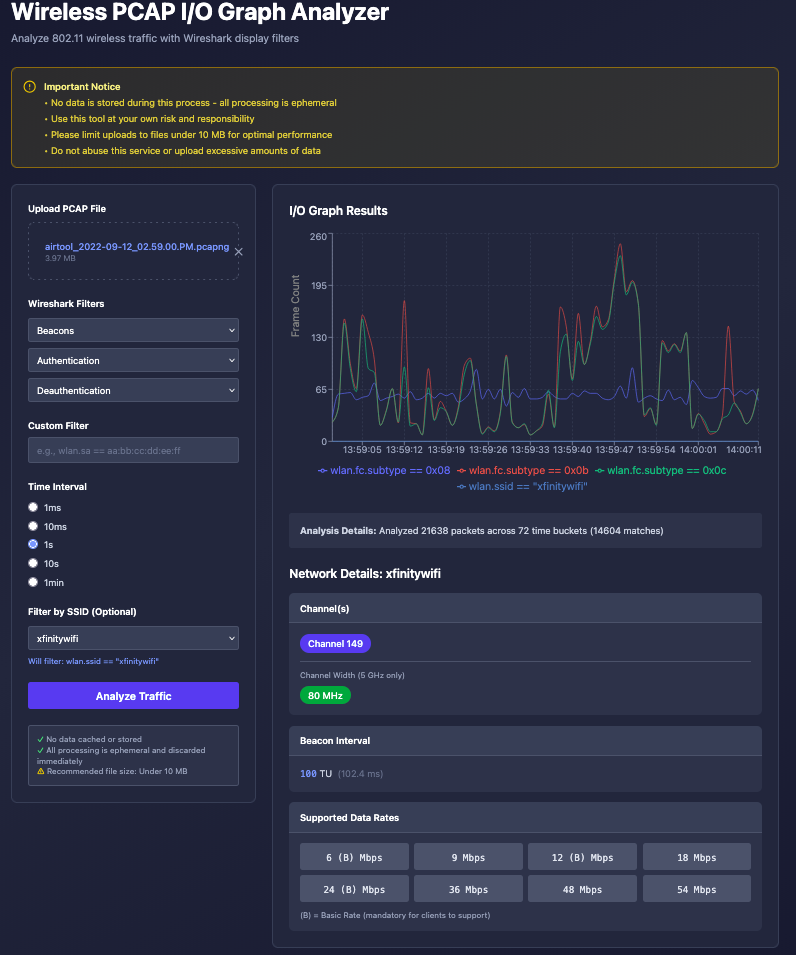
Feel free to leave your feedback, would love to hear your thoughts. Thank you
Thanks for sharing, keep it up. Rome wasn’t built in a day. You will get there and we all will be using your tool.