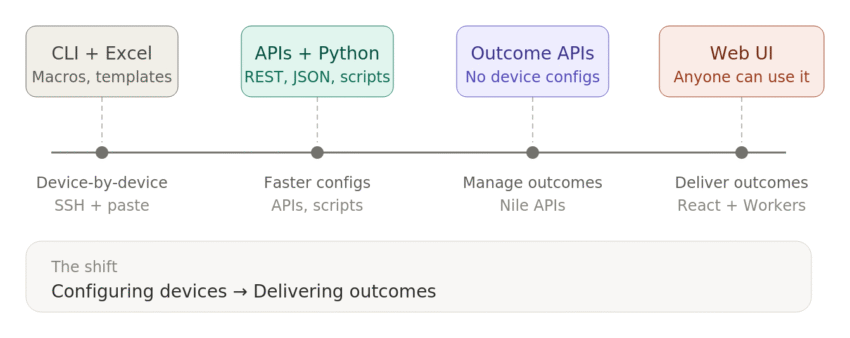
Few years back in my career, I recall having to configure 10, 20, 30 switches, controllers, at times multiple autonomous access points. This required separate configuration for each device. Editing configurations in notepad, duplicating and customizing them for each device, copy paste into multiple devices was a pretty common thing. I am all about efficiency and trying to always find a better way of doing things. Automation meant something very different than what it means today to me. I took an excel document, put together some formulas and macros to create a standard config that can be easily generated using some variables.
I would fill in a hostname, a VLAN ID, a management IP, any other specific information and the macro would spit out a block of IOS commands ready to paste into a terminal. That was the cutting edge for me back then. And honestly, it worked. I configured and deployed a whole lot of devices this way.


This was still a lot of work and any typo would mess up the configuration, manual process of copy and pasting the config and validating it on every device.
Python
What does a snake have to do with networking? While working on a project I learned that I can create a Python script that can log into a device, grab the data into some format I want and save it for me. Check out My First Python Script. This was exciting, being able to go from Excel to an actual programming language and make it automate something that you have to do it multiple times.
The API Awakening
Next stage for this evolution was me hearing about the APIs when I started working with Mist Products. Their APIs opened up something I hadn’t experienced before; the ability to interact with the network programmatically. I started learning Python, not because I wanted to become a developer (yeah seriously, I wouldn’t call myself a developer), but because I wanted to pull data faster than the GUI could show it to me, customize the data how I wanted it and/or my customers wanted it. Check out some of my projects under Tools and Scripts. I wrote scripts to pull AP stats, push WLAN configs, configured templates for multiple device configs and automate things that would’ve taken dozens of clicks in a dashboard.
Mist’s API was my gateway into real automation and realizing the possibilities. I learned about REST calls, JSON payloads, authentication tokens, error handling, going from CLI to APIs was an amazing experience in so many ways.
No Devices to Configure – Now What?
So I start my new job at Nile get my hands on some equipment and this realization hit me.
There are no individual device configurations. None. No AP configs, no switch templates, no per-device profiles. The Nile architecture abstracts all of that away into a service-level model. All access is based on the context and Identity.
I wasn’t going to give up because as I mentioned I am all about optimizing and making things efficient if I can. I found Nile APIs, but instead of writing a script to push configs to devices, I’m writing a script that says “create a guest access code for this portal with this expiration.” The API isn’t about managing infrastructure it’s about managing what the network does for people.
The Python Script:
My first attempt was a python script that worked with the Nile Guest APIs. Goal was to build something that will basically have a simple menu driven work flow to create, edit and delete the Guest Codes.
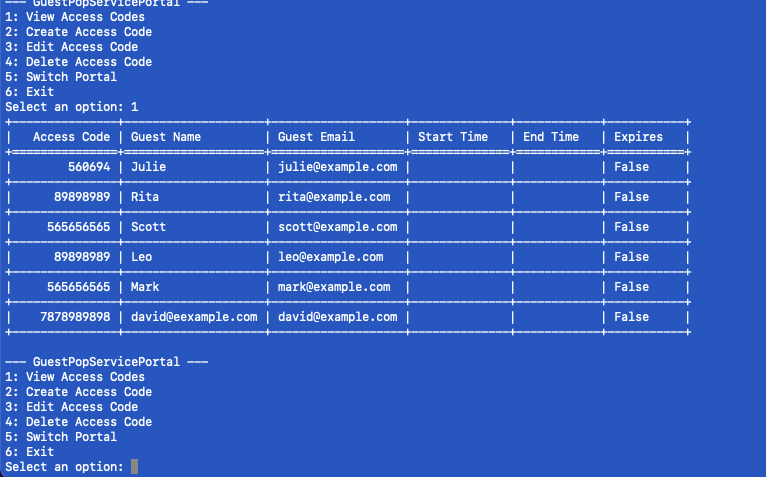
I figured I can simply share this with my customers as well and they can edit and use it however they see fit via github. See demo below.
Something came to my mind, anyone who wanted to use it needed Python installed on their machine and not break things in the script. This is something I can see a technical person using. But what about if the outcome needed is for a non technical person to be able to easily use this. Let’s say a person handling the reception, or an event coordinator etc needs to create the codes, edit them, delete them, bulk upload multiple codes. UI is the answer.
From Script to UI:
I believe to achieve the outcome mentioned above, this will need a web based UI. Just go to a webpage, enter credentials and you are good to go. Created a work flow, took the python script, Cloudflare and Claude code.
- Frontend: React 18 with Vite, no TypeScript, no Tailwind, no CSS framework. Just hand-written CSS and functional components.
- Backend: A Cloudflare Worker acting as a relay a thin serverless function at the edge that proxies requests to Nile’s REST API. Takes care of the Cross-Origin Resource Sharing (CORS).
- Infrastructure: Cloudflare Pages hosting the frontend, the Worker handling the backend. No database. No server framework. (Atleast for now, not looking to get into something complicated because storing someones data leads to other complications and I’m not interested in that for this public UI).
Features:
Here is list of features that I have been able to add.
- Authenticate with your Nile API key
- Pull down your configured guest portals and select one
- There are three possibilities for the portals
- Portal that requires e-mail work flow (nothing to do there)
- Portal with generic access codes
- Portal with non-generic access codes
- Create individual guest access codes with custom expiration
- Bulk create codes by uploading a CSV perfect for events or onboarding batches
- Edit existing codes extend expiration, update details
- Delete codes you no longer need

This pretty much can be used by anyone, no installation, dependencies, terminals, CLI etc.
What This Means:
I think taking APIs, building something useful around them, and then turning that into something other people can use is pretty awesome. The tools available to us now compared to back when I was using Excel macros to generate CLI configs; it’s a completely different world.
The shift from CLI to API to UI isn’t just about tools changing. It’s about what we spend our time on changing. When the infrastructure layer is abstracted away and you’re not burning cycles on per-device configs, you get to focus on building things that actually make the network useful to the people who use it. Building something that a user can open in a browser and accomplish in a few clicks, that’s the shift..
That’s what “CLI to UI” really means. I won’t make a blanket statement and say CLI is dead or not — everyone can form their own opinion on that. Everyone is trying to automate these days and the goal behind automation is standardization, efficiency, less errors, stability for instance. What I feel is that the endpoint of our work is shifting from configuring devices to delivering outcomes.
You can try the tool yourself at niletools.artofrf.com. See a little demo below.
Next up: CLI to UI – Nile Access Management APIs.