artofrf.com

Ali's Technology Blog

Menu
  • Home
  • Important Links
  • About Me
  • Tools and Scripts
Menu

WLAN Validator

Posted on March 11, 2026March 11, 2026 by mali

This was part of my presentation during the WLPC 2026 in Phoenix towards the end. I have been working on this for a while and learning a lot during the process. Idea behind this is to be able to validate as many items from the checklists created by Keith Parsons located here and do it remotely.

Hoping to have multi vendor support depending on the hardware and API access. No information is getting stored so once you reload or reset, it is all gone. NOTE: I do advise you to rotate your keys and/or use read only keys if possible. Use this tool at your own risk.

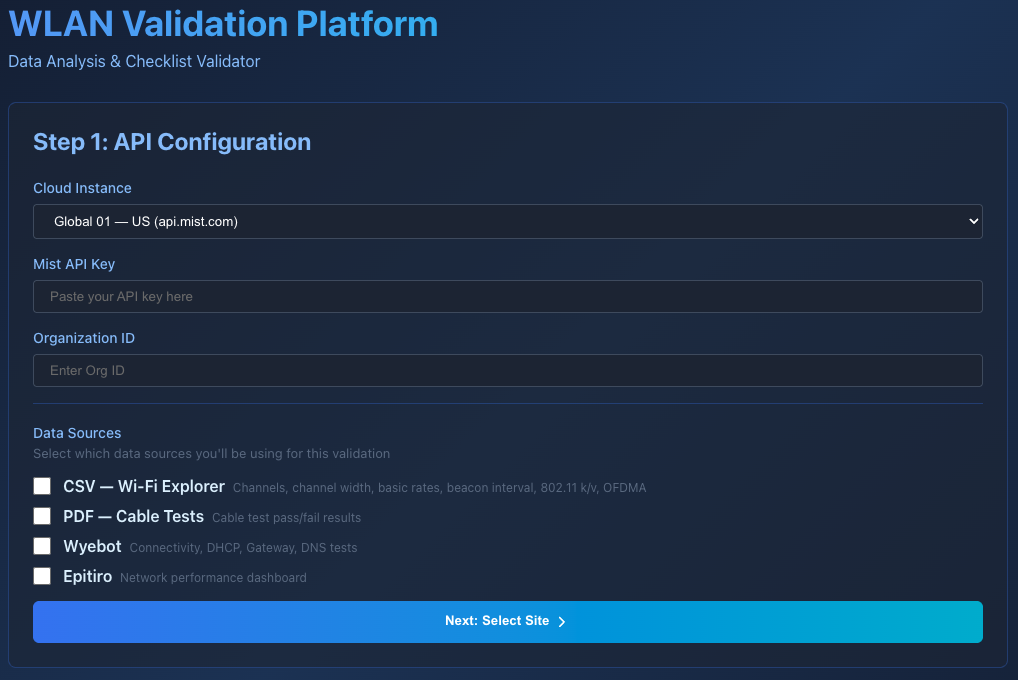
This tool uses multiple data sources but you can choose which ones you want to use. Any test dependent on a data source that you do not pick will simply not be run.

Wyebot requires an active Wyebot subscription and tests created. I mainly use this in testing for client connectivity testing. I simply had to create one DNS test that provided me with all the information I needed.
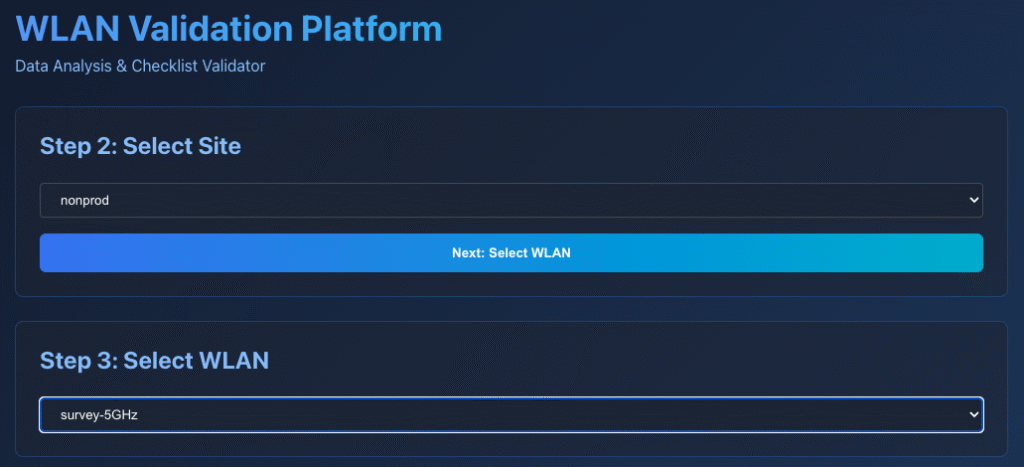
Tool requires a user to choose a site and an SSID they want to focus on.
And here are the results. Based on the pass and failures there is also an overall score.
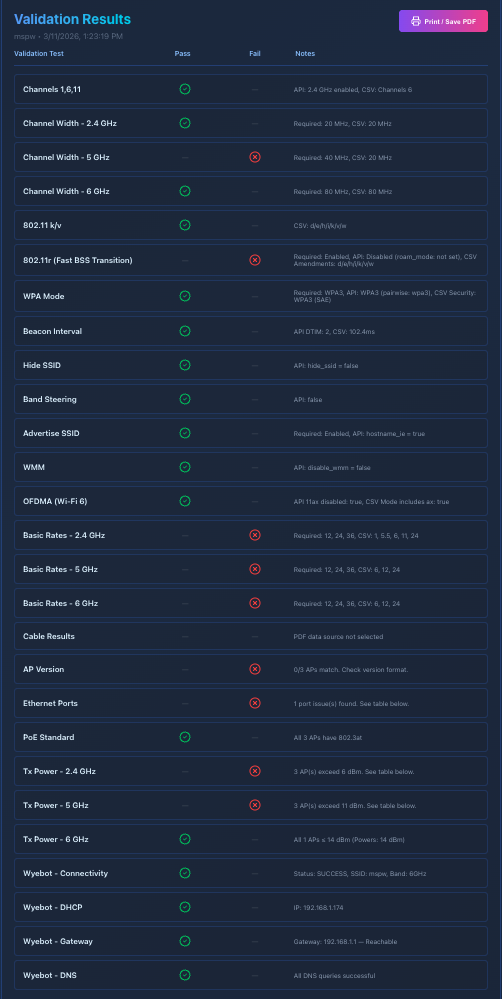
If there are non-compliant access points that information is available as well.

So far I have been able to add 24 tests, it is a work in progress and I’m looking forward to adding more features and functionality to it including data sources and vendors. If you have not tried it, give it a try and let me know what do you think?

  1. Channels 1,6,11
  2. Channel Width – 2.4 GHz (optional)
  3. Channel Width – 5 GHz (optional)
  4. Channel Width – 6 GHz (optional)
  5. 802.11 k/v
  6. 802.11r (Fast BSS Transition)
  7. WPA Mode
  8. Beacon Interval
  9. Hide SSID
  10. Band Steering
  11. Advertise SSID
  12. WMM
  13. OFDMA (Wi-Fi 6)
  14. Basic Rates – 2.4 GHz (optional)
  15. Basic Rates – 5 GHz (optional)
  16. Basic Rates – 6 GHz (optional)
  17. Cable Results
  18. AP Version
  19. Ethernet Ports
  20. PoE Standard
  21. Tx Power – 2.4 GHz
  22. Tx Power – 5 GHz
  23. Tx Power – 6 GHz
  24. Wyebot (Connectivity, DHCP, Gateway, DNS — 4 sub-checks)

Here is the link to access the tool. WLAN Validator.

Category: Tools, Troubleshooting, Wireless, WLAN Tools

Leave a Reply Cancel reply

Your email address will not be published. Required fields are marked *

This site uses Akismet to reduce spam. Learn how your comment data is processed.

Recent Posts

  • Nile Secure Guest – Configuration and Use Case
  • WLAN Pros Toolbox
  • Nile does NAC – Configuring Trust Engine
  • WLAN Validator
  • PCAP I/O Graph Analyzer

Tags

AirDrop arista Arista AGNI Arista CV-CUE Arista NAC Arista WIPS Arista WPA3 UPSK Aruba Central Automating Mist Switch Templates Automation AWDL Configuring Switch Templates in Mist CWAP 403 EAP Format MAC Addresses Hamina Network Planner Juniper SRX300 MacBook Marvis mdns MFD8 MFD9 Mist Access Assurance MistAI Mist Auto Placement Mist MPSK Mist Wireless NaaS Networking Field Day NFD32 NileNav Nile Secure Nile Wi-Fi Social Channels Tech Field Day Troubleshooting with Marvis Troubleshooting with Mist Troubleshooting with Mist AI Troubleshooting with Wireshark Wireless Adjuster Wireless Adjuster Level II Wireless troubleshooting WLPC wlpc2023 Wyebot

Tech Blogs

  • WiFiTodd
  • CCNA Wireless
  • Cisco Full Bars
  • Packet Life
  • Havilandweb
  • Gjermund Raaen
  • Bad-Fi
  • The ASCII Construct
  • Juniper Port Checker
  • WiFrizzy
  • Spectrum Chart
  • BadgerWiFi

Recent Comments

  • Hiten Thakkar on PCAP I/O Graph Analyzer
  • mali on Deploying Nile Secure – My First NSB
  • Larry Farrish on Deploying Nile Secure – My First NSB
  • Courtney on Mist Access Point – CSV
  • ayoub chabrouk on Ubiquiti stealing the show at MFD11

Archives

  • August 2026
  • July 2026
  • March 2026
  • February 2026
  • December 2025
  • November 2025
  • October 2025
  • August 2025
  • May 2025
  • January 2025
  • December 2024
  • November 2024
  • October 2024
  • September 2024
  • August 2024
  • July 2024
  • May 2024
  • April 2024
  • March 2024
  • February 2024
  • January 2024
  • December 2023
  • September 2023
  • August 2023
  • June 2023
  • May 2023
  • April 2023
  • February 2023
  • November 2022
  • October 2022
  • August 2022
  • July 2022
  • June 2022
  • May 2022
  • April 2022
  • March 2022
  • February 2022
  • January 2022
  • December 2021
  • November 2021
  • October 2021
  • September 2021
  • August 2021
  • July 2021
  • May 2021
  • April 2021
  • March 2021
  • July 2020
  • June 2020
  • May 2020
  • April 2020
  • March 2020
  • February 2020
  • January 2020
  • December 2019
  • November 2019
  • October 2019
  • September 2019
  • August 2019
  • July 2019
  • June 2019
  • April 2019
  • March 2019
  • November 2018
  • October 2018
  • September 2018
  • May 2018
  • January 2018
  • December 2017
  • August 2017
  • January 2017
  • September 2014
  • December 2013
  • October 2013
  • May 2013
  • August 2012
  • July 2012

Meta

  • Log in
  • Entries feed
  • Comments feed
  • WordPress.org

Categories

  • AeroHive
  • Arista
  • Arista
  • Aruba
  • Aruba
  • Aruba Central
  • BYoD
  • Certifications
  • Cisco
  • Cisco
  • Cisco EEM Scripting
  • Cisco Routing
  • Cisco Security
  • Cisco VoIP
  • Cisco VPN
  • Cisco Wireless
  • Conferences and Meetings
  • Design
  • Ekahau
  • General
  • Hamina
  • IoT, IIoT, OT
  • Juniper Security
  • Juniper Switching
  • Juniper/Mist
  • Linux
  • Microsoft
  • Mist
  • Mist Wireless
  • Nile
  • Nile Secure
  • Nile Wi-Fi
  • Programming/Automation
  • Python
  • Ruckus
  • Ruckus Wireless
  • Ruckus/Brocade
  • Ruckus/Brocade Scripting
  • Ruckus/Brocade Switching
  • Secure Guest Service
  • Security
  • Switching
  • Tools
  • Troubleshooting
  • Trust Engine
  • Uncategorized
  • Windows
  • Wireless
  • Wireless
  • WLAN Tools
© 2026 artofrf.com | Powered by Minimalist Blog WordPress Theme