
A recent tweet from @wirednot, showing an old GUI of ICX7150 led to a thread of some fun tweets. One tweet in particular from @sharanmahadevan recommending the FastIron 9.x code, and a screenshot showing a fancy GUI got me curious and I decided to update my ICX7150 12 port switch.
Update process is straightforward using tftp. After loading the new firmware I rebooted the switch. Once the switch came back online, nothing was working. I consoled into the switch, tried couple of ping commands with no luck. My next step was to look at the interfaces and config. This is where it got interesting. “show runn” output below showed no IP addresses under my VLAN interfaces. “show ip int” command did not show any results either. It looks like moving from 08.0.95c to 09.0.00a all IP config was removed.

Digging into a bit I realized that configuration format is a bit different in this code. My previous code used the “router-interface ve ##” command under the VLAN interface in addition to “interface ve ##”.

FastIron 9.x does not even have that command available, as shown below:

I simply had to go under the interfaces and ad IP addresses, as shown:

NOTE: Any IP’s I had on the L3 Physical interfaces were gone also. I had to re IP my interfaces as well. I’d say these were two crucial gotchas to keep in mind. I do not know why the IP was removed from the Physical interfaces though; as there is no difference in the syntax. Perhaps someone from Ruckus can comment on that piece. But I definitely like the updated way to configure the VLAN interfaces.
This is just a little gotcha I wanted to mention before I started looking at the updated GUI.


While in the dashboard, I liked the fact that I am able to view the port description by simply hovering my mouse over the port:

I do not have a stack so I’ll skip that part. Port Settings section gives some easy to configure options.
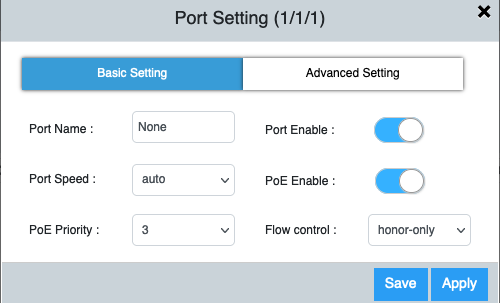

Under Layer 2 you get the following options:
- LAG
- VLAN
- LLDP
Under LAG you can create new LAGs after clicking on the “+” sign. All ports need to match in order for the LAG to form. Otherwise switch gives you an error.

Under VLAN there are options to configure VLANs, tag/untag ports to VLANs and create new VLANs by clicking on the “+” sign

Advanced settings allow you to configure things like IGMP Snooping, Multicast Version, Spanning Tree, ARP Inspection, IP4 DHCP Snooping.

LLDP Status allows us to enable/disable LLDP and shows any LLDP enabled devices connected. Hovering your mouse over the devices gives you some information on the device.

Layer 3 menu gives us the following two options:
- Routes
- VE
As far as I can tell, “Routes” section allows us to add routes an view any existing routes. However, for some reason I was expecting to see my default route in there but I do not.


VE shows, all the VLAN interfaces configured. These can be edited and new ones added here:


Under Management, following options are available:
- Infra – Allows for config archive and manage firmware
- Syslog – Shows logs and allows us to add a syslog server
- DNS Server – Configure DNS servers
- Polling Interval – Allows us to configure how often we want to poll different services/hardware
Under Security, following options are available:
- AAA Servers – configure AAA servers and/or any local users
- ACL – Allows us to configure and/or edit ACLs.
It may be just me, but I feel like configuring ACLs is much easier via CLI than try to do via the UI. I tried to test out the interface and it was not working as I expect it to work. After adding the name and first rule, I was not able to add any other rules to the ACL. I clicked on the “+” sign to add more rules, it turned grey but no options to add more lines.

Another cool feature I’d like to mention is the “Web CLI” option.


NOTE: Web CLI is really cool however, it seems a little finicky and slow. Tab auto complete wasn’t working, adding a “?” to see available commands was not always working. But I am glad it is available.
Overall I think this is a really good update from Ruckus. One thing I did not see in here was DHCP Server settings. No options to view or configure.
Lastly I did not see any basic troubleshooting tools included in the UI for example, MAC lookup, arp, ping, traceroute, PoE, port bounce etc. I think adding these tools in the UI will provide great value.
NOTE: Version:09.0.00aT213 won’t connect to the vSZ. I can run show commands but no commands to add it.