artofrf.com

Ali's Technology Blog

Menu
  • Home
  • Important Links
  • About Me
  • Tools and Scripts
Menu

Juniper Mist – 802.11r Support

Posted on February 1, 2024February 4, 2024 by mali

IEEE 802.11r-2008 is an amendment to the 802.11 standard that allows clients to roam without having to go through the full re-authentication. Premise of this write up is not an introduction/deep dive into 802.11r but to test and better understand how Juniper Mist WLAN implements it and how the Adaptive aka Hybrid, Mixed approach works. If you want to read up more about 802.11r here are some resources I can recommend:

  • Wiki – IEEE 802.11r-2008
  • CWNP – CWAP and CWSP courses
  • Wireless Security Architecture and Maintaining Enterprise Networks by Jennifer Minella
  • IEEE 802.11r

There are three ways this gets implemented:

  • 802.11r Mode only – Clients that support 802.11r can connect and benefit from it. AKM Key Management only shows FT. Clients that can’t support 802.11r are unable to connect.
  • Adaptive Mode – This mode hides the FT in the AKM Key but if a client that does support it connects they will be able to benefit from it.
  • Mixed/Hybrid Mode – In this mode two AKM Key Management will show up FT and non-FT. Clients that support it will use the FT method, client that can’t support it will use the non-FT method.

802.11r Mixed/Hybrid mode

There’s been some really good articles on this subject so I do not want to dig to much into, but I’d like to share/recommend that you do read these blog posts:

  • Cisco’s Adaptive 11r (Thanks Brian Powers for recommending this)
  • Fast Secure Roaming Overview – Gjermund Raaen

Test Setup:

  • Wi-Fi Explorer 3
  • Macbook Air
  • Mist AP43
  • SSIDs
    • mDNS-Test (WPA3/SAE) – 802.11r (Zerbra Compatibility)
    • 80211r (WPA3/SAE) – 802.11r
    • Mist-TLS (WPA3/Enterprise) – 802.11r
    • mspw (WPA3/SAE) – No 802.11r

Test 1 – mDNS-Test:

First SSID setup looked something like this.

Mist SSID – 802.11r – Zebra Compatibility

This screen shot from Wi-Fi Explorer 3 shows the Mobility Domain and RSNE information, it also shows two different AKM Management Suites showing the Mixed mode of 802.11r mentioned earlier. There is an option to enable “Zebra Compatibility” and from what I can tell it makes the “FT Capability and Policy to use Over-the-DS Fast BSS Transition”.

802.11r – Zebra Compatibility pcap

Test 2 – 80211r:

Almost the same as the previous one. In this case I did turn off the “Zebra Compatibility” though.
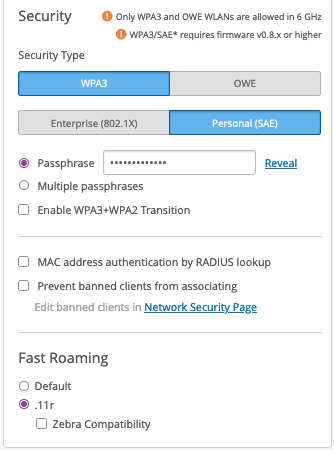
802.11r

This screen shot from Wi-Fi Explorer 3 shows the Mobility Domain and RSNE information, it also shows two different AKM Management Suites showing the Mixed mode of 802.11r mentioned earlier. Since I do not have the “Zebra Compatibility” on, I do not see the “Over-the-DS Fast BSS Transtition”. It is now showing “Over-the Air Fast BSS Transition”. However, I need to confirm what is that value of “0” representing in the capture.
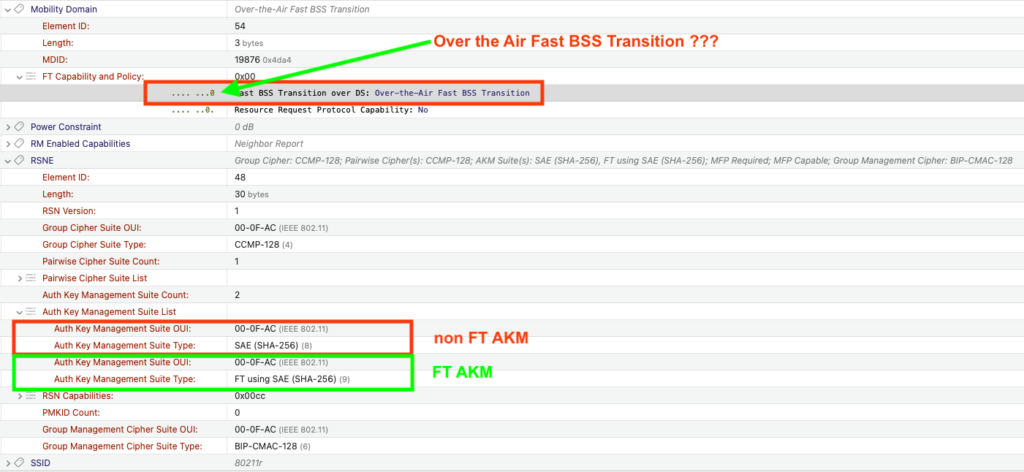
802.11r

Test 3 – Mist-TLS:

This SSID is setup with WPA3/Enterprise and I wanted to see what the behavior looks like with the 802.1X Authentication.
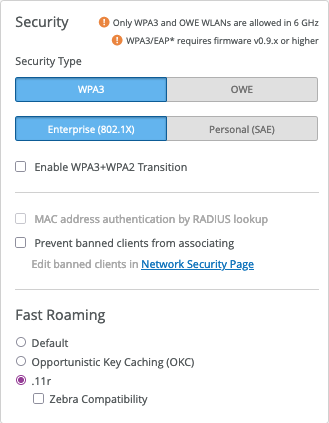
802.1X – 802.11r

This screen shot from Wi-Fi Explorer 3 shows the Mobility Domain and RSNE information for a WPA3/Enterprise SSID, it also shows two different AKM Management Suites showing the Mixed mode of 802.11r mentioned earlier. No “Zebra Compatibility” on, I do not see the “Over-the-DS Fast BSS Transtition”. It is showing “Over-the Air Fast BSS Transition”.
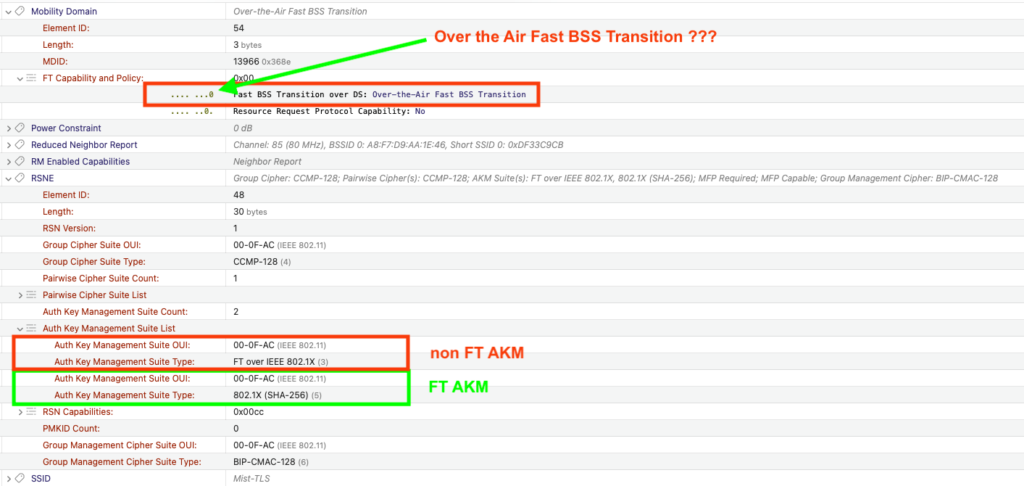
802.1X – 802.11r

Test 4 – mspw:

This SSID is not using 802.11r, instead I am using the Default Juniper Mist behavior (*** UPDATE: Default behavior is PMK Caching aka fast roaming back).
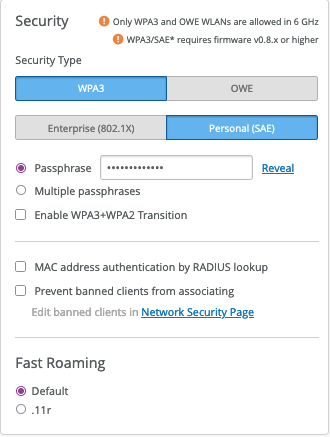
non 802.11r SSID

This screen shot from Wi-Fi Explorer 3 shows that there is no Mobility Domain and RSNE information for this SSID, it also shows only one AKM Management Suites.
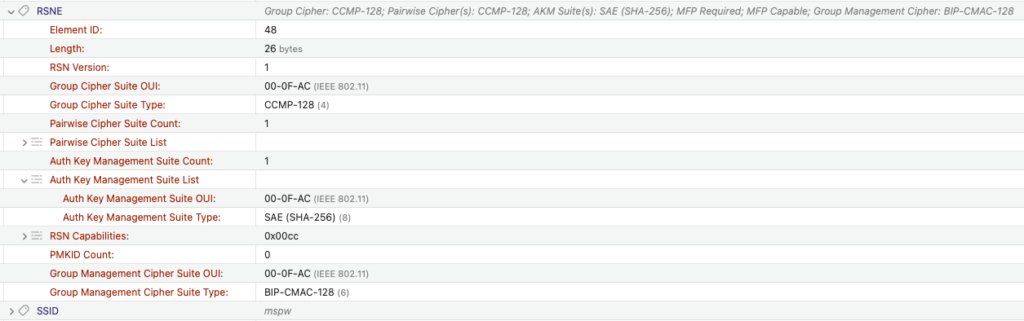
non 802.11r SSID

What about WPA2:

Quick note as this question came up. WPA2 SSID displays the same behavior.
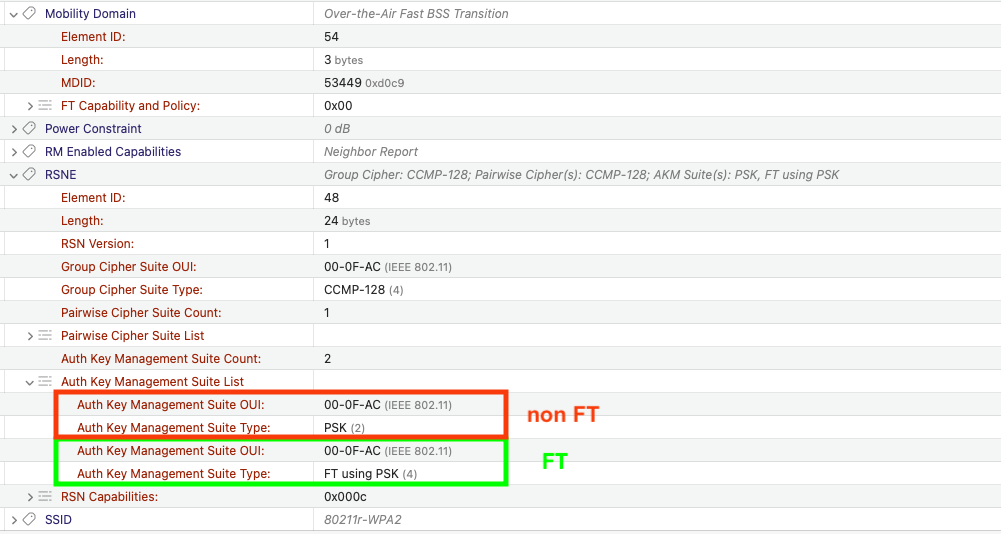
WPA2 – 80211r

Summary:

After all this, as far as I can tell Mist supports the Hybrid/Mixed mode of the 802.11r, which basically includes two different AKM Suites, one for the clients that support 802.11r and one can be used by the the clients that do not support 802.11r.

Keep in mind that lots of all this will also depend on your clients, how old are they, their capabilities and drivers etc. Know your clients and their capabilities and TEST before turning features on and/or off.

Category: Juniper/Mist, Mist, Mist Wireless, Wireless

2 thoughts on “Juniper Mist – 802.11r Support”

  1. Jesus Pavon says:
    February 1, 2024 at 11:04 pm

    Mist default roaming means full authentication.

    Reply
    1. mali says:
      February 2, 2024 at 10:11 pm

      Not true, it uses PMK Caching, basically fast roaming back.

      Reply

Leave a Reply Cancel reply

Your email address will not be published. Required fields are marked *

This site uses Akismet to reduce spam. Learn how your comment data is processed.

Recent Posts

  • Nile Secure Guest – Configuration and Use Case
  • WLAN Pros Toolbox
  • Nile does NAC – Configuring Trust Engine
  • WLAN Validator
  • PCAP I/O Graph Analyzer

Tags

AirDrop arista Arista AGNI Arista CV-CUE Arista NAC Arista WIPS Arista WPA3 UPSK Aruba Central Automating Mist Switch Templates Automation AWDL Configuring Switch Templates in Mist CWAP 403 EAP Format MAC Addresses Hamina Network Planner Juniper SRX300 MacBook Marvis mdns MFD8 MFD9 Mist Access Assurance MistAI Mist Auto Placement Mist MPSK Mist Wireless NaaS Networking Field Day NFD32 NileNav Nile Secure Nile Wi-Fi Social Channels Tech Field Day Troubleshooting with Marvis Troubleshooting with Mist Troubleshooting with Mist AI Troubleshooting with Wireshark Wireless Adjuster Wireless Adjuster Level II Wireless troubleshooting WLPC wlpc2023 Wyebot

Tech Blogs

  • WiFiTodd
  • CCNA Wireless
  • Cisco Full Bars
  • Packet Life
  • Havilandweb
  • Gjermund Raaen
  • Bad-Fi
  • The ASCII Construct
  • Juniper Port Checker
  • WiFrizzy
  • Spectrum Chart
  • BadgerWiFi

Recent Comments

  • Hiten Thakkar on PCAP I/O Graph Analyzer
  • mali on Deploying Nile Secure – My First NSB
  • Larry Farrish on Deploying Nile Secure – My First NSB
  • Courtney on Mist Access Point – CSV
  • ayoub chabrouk on Ubiquiti stealing the show at MFD11

Archives

  • August 2026
  • July 2026
  • March 2026
  • February 2026
  • December 2025
  • November 2025
  • October 2025
  • August 2025
  • May 2025
  • January 2025
  • December 2024
  • November 2024
  • October 2024
  • September 2024
  • August 2024
  • July 2024
  • May 2024
  • April 2024
  • March 2024
  • February 2024
  • January 2024
  • December 2023
  • September 2023
  • August 2023
  • June 2023
  • May 2023
  • April 2023
  • February 2023
  • November 2022
  • October 2022
  • August 2022
  • July 2022
  • June 2022
  • May 2022
  • April 2022
  • March 2022
  • February 2022
  • January 2022
  • December 2021
  • November 2021
  • October 2021
  • September 2021
  • August 2021
  • July 2021
  • May 2021
  • April 2021
  • March 2021
  • July 2020
  • June 2020
  • May 2020
  • April 2020
  • March 2020
  • February 2020
  • January 2020
  • December 2019
  • November 2019
  • October 2019
  • September 2019
  • August 2019
  • July 2019
  • June 2019
  • April 2019
  • March 2019
  • November 2018
  • October 2018
  • September 2018
  • May 2018
  • January 2018
  • December 2017
  • August 2017
  • January 2017
  • September 2014
  • December 2013
  • October 2013
  • May 2013
  • August 2012
  • July 2012

Meta

  • Log in
  • Entries feed
  • Comments feed
  • WordPress.org

Categories

  • AeroHive
  • Arista
  • Arista
  • Aruba
  • Aruba
  • Aruba Central
  • BYoD
  • Certifications
  • Cisco
  • Cisco
  • Cisco EEM Scripting
  • Cisco Routing
  • Cisco Security
  • Cisco VoIP
  • Cisco VPN
  • Cisco Wireless
  • Conferences and Meetings
  • Design
  • Ekahau
  • General
  • Hamina
  • IoT, IIoT, OT
  • Juniper Security
  • Juniper Switching
  • Juniper/Mist
  • Linux
  • Microsoft
  • Mist
  • Mist Wireless
  • Nile
  • Nile Secure
  • Nile Wi-Fi
  • Programming/Automation
  • Python
  • Ruckus
  • Ruckus Wireless
  • Ruckus/Brocade
  • Ruckus/Brocade Scripting
  • Ruckus/Brocade Switching
  • Secure Guest Service
  • Security
  • Switching
  • Tools
  • Troubleshooting
  • Trust Engine
  • Uncategorized
  • Windows
  • Wireless
  • Wireless
  • WLAN Tools
© 2026 artofrf.com | Powered by Minimalist Blog WordPress Theme