artofrf.com

Ali's Technology Blog

Menu
  • Home
  • Important Links
  • About Me
  • Tools and Scripts
Menu

Connecting my lab on the go

Posted on December 20, 2024December 20, 2024 by mali

I recently had a need to setup connectivity for full stack lab gear and VMs etc on the go. There are bunch of options available to do this and I needed to do this on a small budget. Some of the options I looked at are below:

Starlink:

Since the coverage desired is on the go, only option available was the “Roam” option. Basic Roam 50 Gig plan for $50 would have been fine for me. But then there was cost of the equipment which was $449 currently but originally it is around $599. Lastly, my concern was that I may be in a room/area without any windows or view of the sky, then what?

Based on the equipment cost and need to have a clear view of the sky, I decided to not go this route.
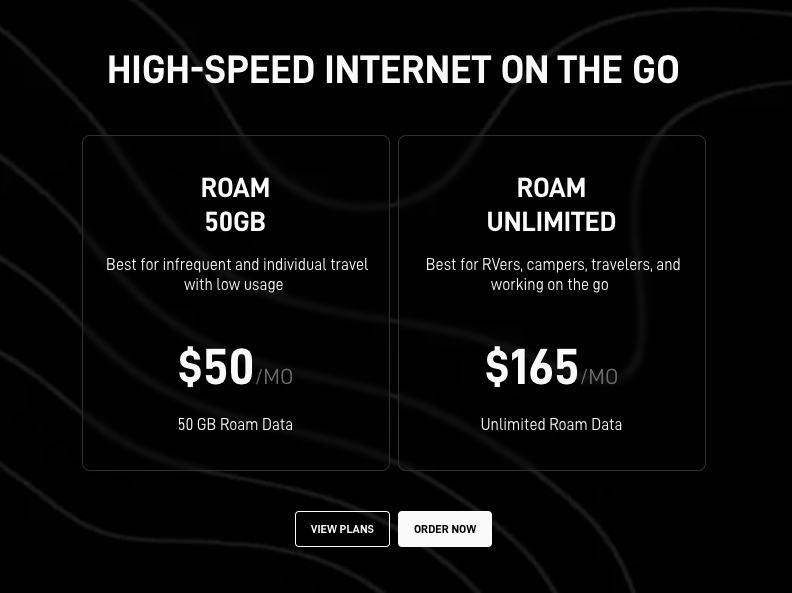
Starlink – Roam plan

T-Mobile 5G internet plan:

Since I am already a T-Mobile customer I decided to look into the T-Mobile 5G internet plan that they kept advertising for $50. This $50 plan is residential only and geo locked. Even if you get a business plan, it is geo locked so you can’t travel with it.

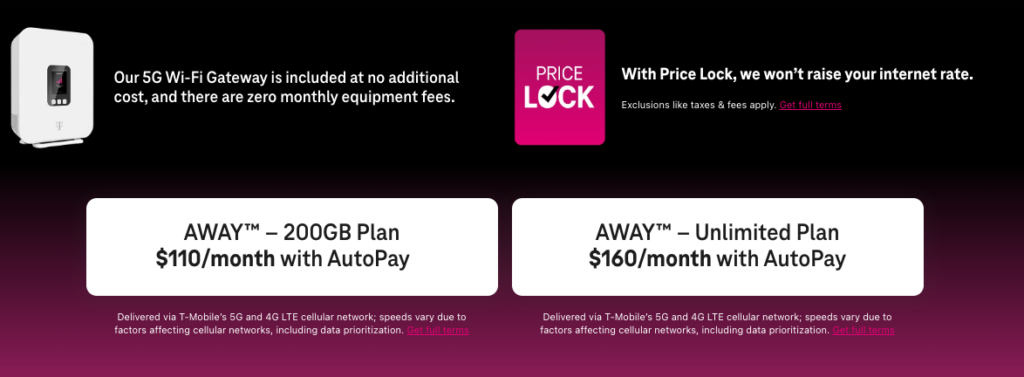
If you need something on the go, that requires the T-Mobile 5G Internet AWAY plan. $110 for 200 Gig isn’t so bad and more than enough for what I need it for. Plus it comes with the Wi-Fi Gateway. NOTE: This 5G internet gateway comes with RPSMA connectors also if you want to hook up an external antenna to it. I liked this solution, but then again $110 per month with a contract is not something I was looking to spend, atleast not right now.
T-Mobile 5G hotspot:

Last option I looked at was using the T-Mobile hotspot. I figured I can simply add this to my T-Mobile plan and I already get about 50 Gigs of hotspot data that I can use. But I was told that I will need to get a separate plan for this, which means $50/month for a 50 Gig plan, (Note: looks like they are now also doing $50/month for 100 Gig also). Plus the cost of the hotspot around $264.

I decided to not go with this plan because if I am going to pay for this, I might as well just use my phone as hotspot.
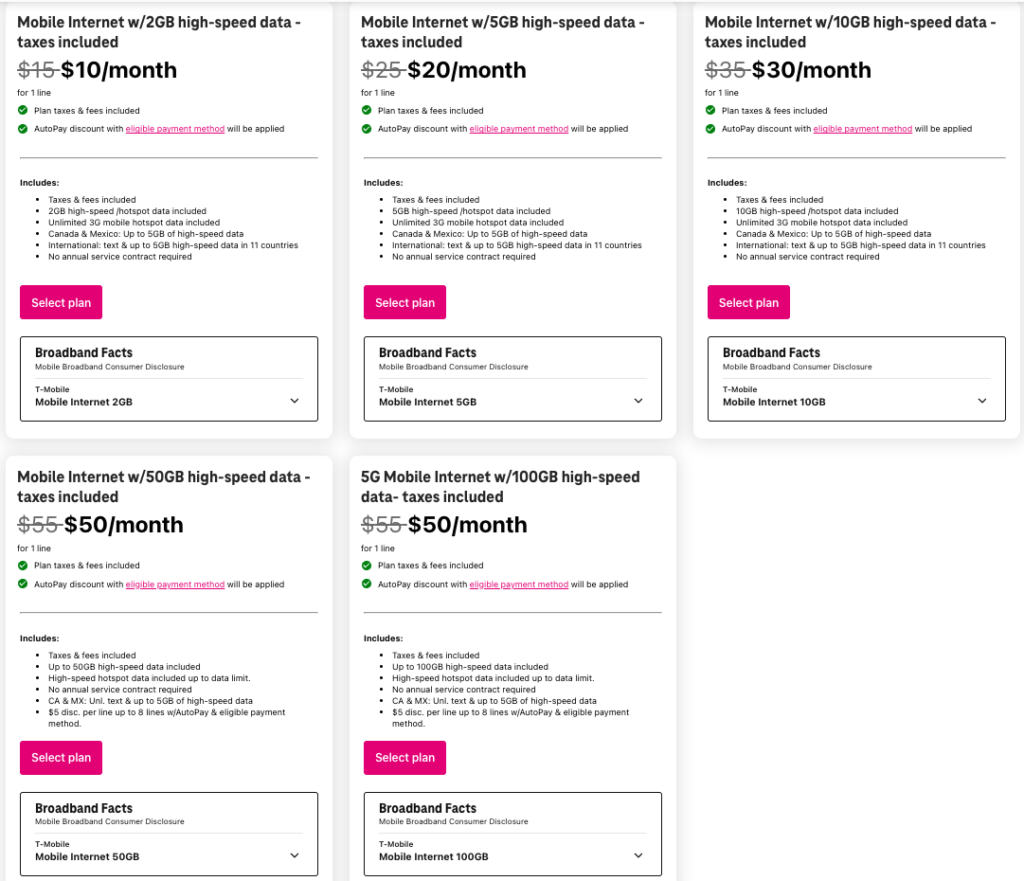
T-Mobile Hotspot plans

Connecting to my Cellphone hotspot:

How do I connect my lab to my phone now? My firewall isn’t able to do that, there is no ethernet port. My requirements were:

  • I needed something as soon as possible, was hoping to grab it from Best Buy.
  • Not very expensive.
  • Fast boot time and easy to setup.
  • Something that will connect to the Wi-Fi on my phone for the internet.
  • Will have an ethernet port that I can connect my firewall to for outbound connectivity.

Good friend and a fellow Wireless guy Drew Lentz aka WirelessNerd just started working for Eero. I knew about their Mesh capabilities so I decided to message Drew. Drew confirmed that you are able to do this with the Plus subscription. (Note: Basic subscription AFAIK is free).

I ran over to Best Buy and was able to find a single unit for a pretty good price.

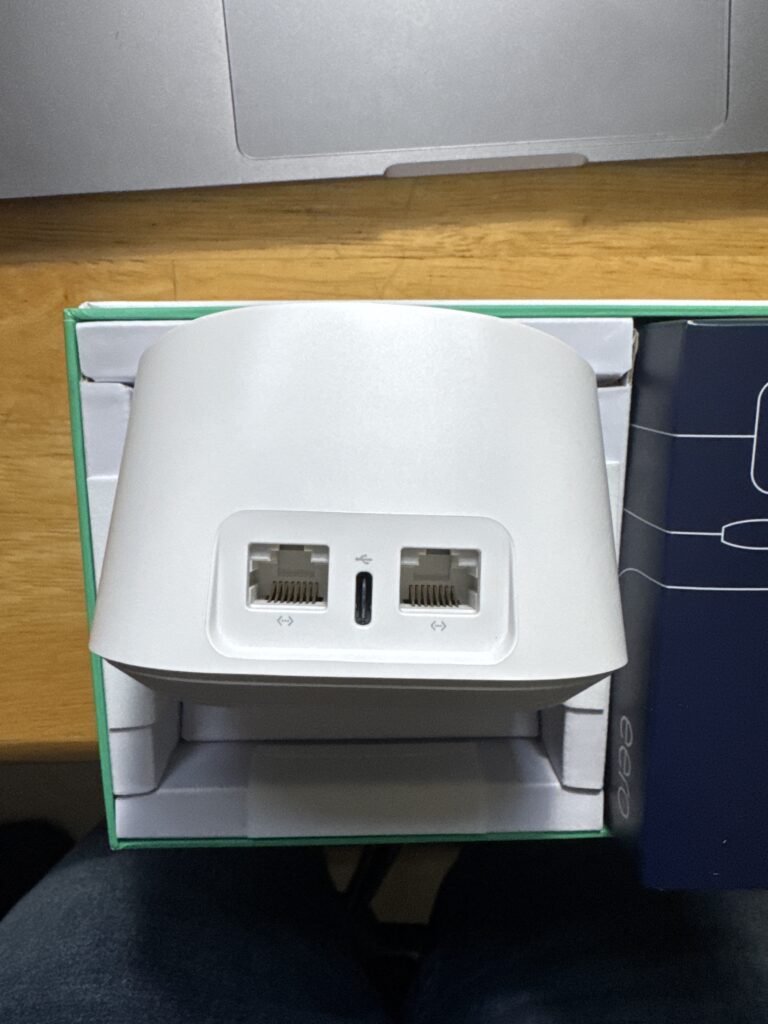
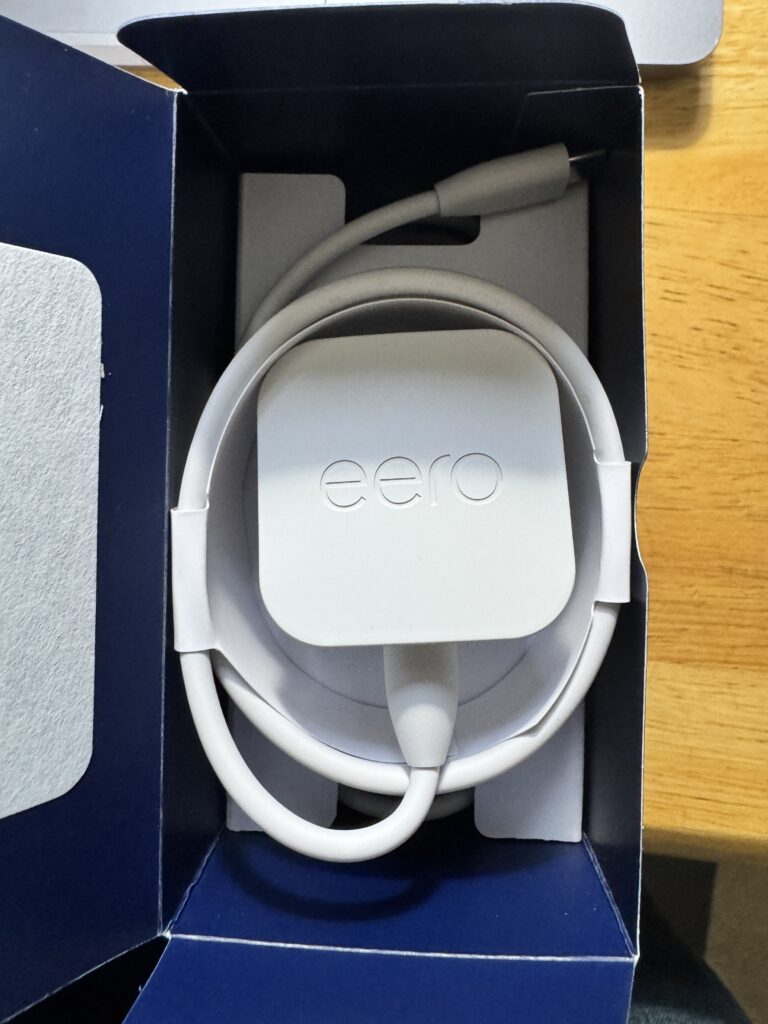
Eero 6+ What’s in the box:

Eero 6+ – What’s in the box

Setting up the unit:

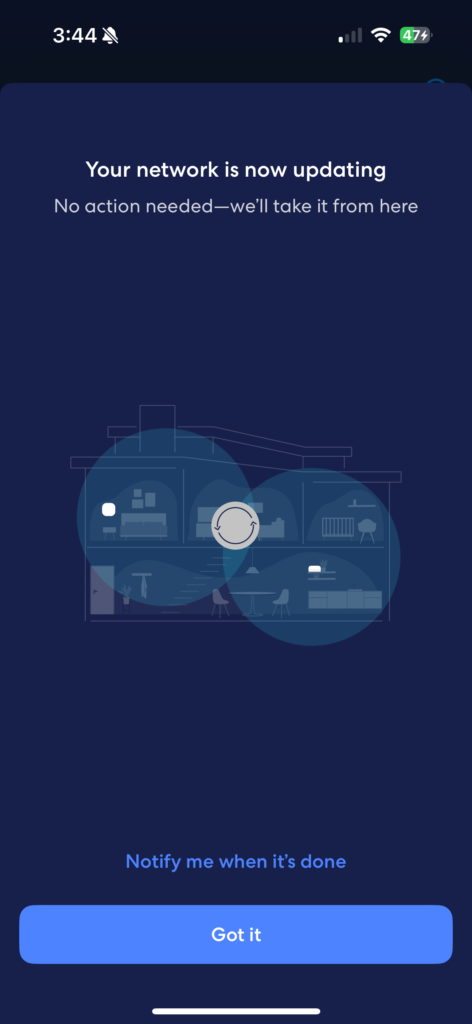
Setting up the unit was easy, I did need to connect it to the hardwire for the initial setup. One thing that was confusing was the fact that LAN/WAN ports aren’t labeled. I’m not sure if it just auto detects it or use the first one you connect as WAN and next one as LAN, but I just went with what the picture shows.
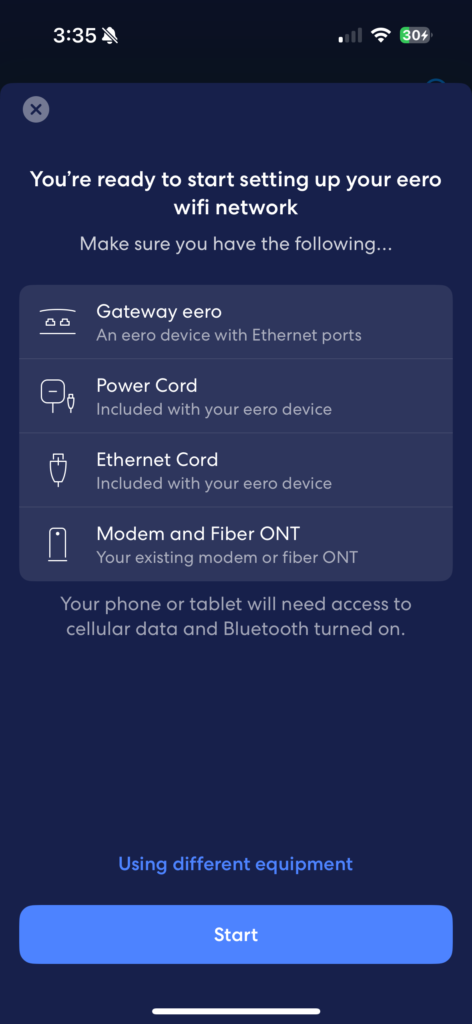
Eero 6+ setup

Next step was to sign up for the Plus subscription so that I can use the “Internet Backup” feature.

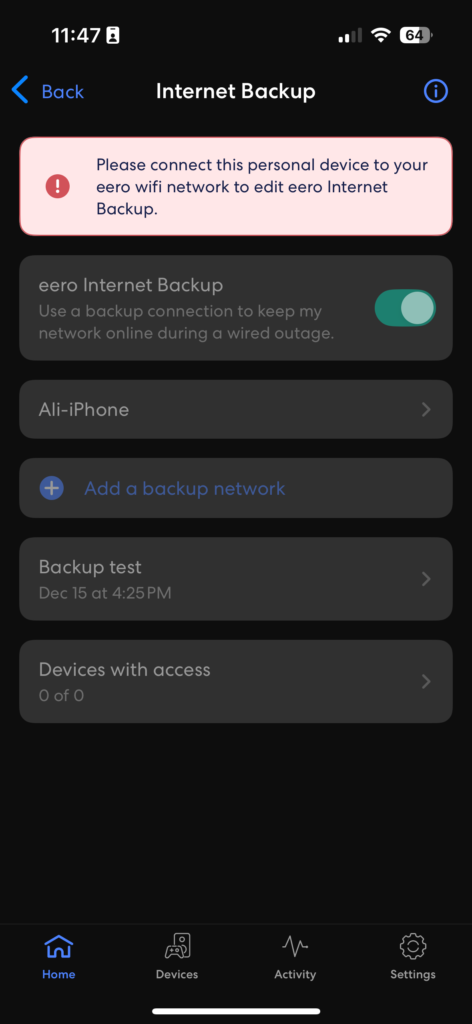
Eero 6+ Internet Backup

Once the “Plus” subscription is active, you can simply slide the “eero Internet Backup” button and then “Add a backup network”. I was able to connect to my cellphone hotspot. Connected my firewall to one of the ethernet ports on the Eero 6+ and everything was online in a few min.

I was thinking that using multiple Eero devices I may be able to extend this setup if I am stuck in a room with no cell coverage and I need temporary coverage by putting my cellphone outside the conference room. But looks like the remote units don’t have the ethernet ports so that may not be possible, I still can use a longer ethernet cord however it needed. Overall I loved using Eero that allowed me to accomplish what I needed to accomplish for a good price.

Category: General, Tools, Wireless

Leave a Reply Cancel reply

Your email address will not be published. Required fields are marked *

This site uses Akismet to reduce spam. Learn how your comment data is processed.

Recent Posts

  • Nile Secure Guest – Configuration and Use Case
  • WLAN Pros Toolbox
  • Nile does NAC – Configuring Trust Engine
  • WLAN Validator
  • PCAP I/O Graph Analyzer

Tags

AirDrop arista Arista AGNI Arista CV-CUE Arista NAC Arista WIPS Arista WPA3 UPSK Aruba Central Automating Mist Switch Templates Automation AWDL Configuring Switch Templates in Mist CWAP 403 EAP Format MAC Addresses Hamina Network Planner Juniper SRX300 MacBook Marvis mdns MFD8 MFD9 Mist Access Assurance MistAI Mist Auto Placement Mist MPSK Mist Wireless NaaS Networking Field Day NFD32 NileNav Nile Secure Nile Wi-Fi Social Channels Tech Field Day Troubleshooting with Marvis Troubleshooting with Mist Troubleshooting with Mist AI Troubleshooting with Wireshark Wireless Adjuster Wireless Adjuster Level II Wireless troubleshooting WLPC wlpc2023 Wyebot

Tech Blogs

  • WiFiTodd
  • CCNA Wireless
  • Cisco Full Bars
  • Packet Life
  • Havilandweb
  • Gjermund Raaen
  • Bad-Fi
  • The ASCII Construct
  • Juniper Port Checker
  • WiFrizzy
  • Spectrum Chart
  • BadgerWiFi

Recent Comments

  • Hiten Thakkar on PCAP I/O Graph Analyzer
  • mali on Deploying Nile Secure – My First NSB
  • Larry Farrish on Deploying Nile Secure – My First NSB
  • Courtney on Mist Access Point – CSV
  • ayoub chabrouk on Ubiquiti stealing the show at MFD11

Archives

  • August 2026
  • July 2026
  • March 2026
  • February 2026
  • December 2025
  • November 2025
  • October 2025
  • August 2025
  • May 2025
  • January 2025
  • December 2024
  • November 2024
  • October 2024
  • September 2024
  • August 2024
  • July 2024
  • May 2024
  • April 2024
  • March 2024
  • February 2024
  • January 2024
  • December 2023
  • September 2023
  • August 2023
  • June 2023
  • May 2023
  • April 2023
  • February 2023
  • November 2022
  • October 2022
  • August 2022
  • July 2022
  • June 2022
  • May 2022
  • April 2022
  • March 2022
  • February 2022
  • January 2022
  • December 2021
  • November 2021
  • October 2021
  • September 2021
  • August 2021
  • July 2021
  • May 2021
  • April 2021
  • March 2021
  • July 2020
  • June 2020
  • May 2020
  • April 2020
  • March 2020
  • February 2020
  • January 2020
  • December 2019
  • November 2019
  • October 2019
  • September 2019
  • August 2019
  • July 2019
  • June 2019
  • April 2019
  • March 2019
  • November 2018
  • October 2018
  • September 2018
  • May 2018
  • January 2018
  • December 2017
  • August 2017
  • January 2017
  • September 2014
  • December 2013
  • October 2013
  • May 2013
  • August 2012
  • July 2012

Meta

  • Log in
  • Entries feed
  • Comments feed
  • WordPress.org

Categories

  • AeroHive
  • Arista
  • Arista
  • Aruba
  • Aruba
  • Aruba Central
  • BYoD
  • Certifications
  • Cisco
  • Cisco
  • Cisco EEM Scripting
  • Cisco Routing
  • Cisco Security
  • Cisco VoIP
  • Cisco VPN
  • Cisco Wireless
  • Conferences and Meetings
  • Design
  • Ekahau
  • General
  • Hamina
  • IoT, IIoT, OT
  • Juniper Security
  • Juniper Switching
  • Juniper/Mist
  • Linux
  • Microsoft
  • Mist
  • Mist Wireless
  • Nile
  • Nile Secure
  • Nile Wi-Fi
  • Programming/Automation
  • Python
  • Ruckus
  • Ruckus Wireless
  • Ruckus/Brocade
  • Ruckus/Brocade Scripting
  • Ruckus/Brocade Switching
  • Secure Guest Service
  • Security
  • Switching
  • Tools
  • Troubleshooting
  • Trust Engine
  • Uncategorized
  • Windows
  • Wireless
  • Wireless
  • WLAN Tools
© 2026 artofrf.com | Powered by Minimalist Blog WordPress Theme