
I have been using every product from Intuitibits for a while now and every product has served me well when it comes to working with Wi-Fi.
I recall seeing a glimpse of Wi-Fi Signal Pro, and I was very excited seeing the new UI and logging capabilities. Even with the older version I loved the logs it provided and they were very useful when I was trying to troubleshoot, gather data and/or survey. I’ve had a chance to beta test the Pro version and it takes visibility to another level.
This is the first view when you open up, nice crisp view showing you all the basic things you want to look at.
- Channel Utilization
- Signal / SNR / MCS / Rate
- Band / Channel / Width / Streams / PHY
- Internet Connectivity / Internet speed test
- Access Point
- Information about Mac
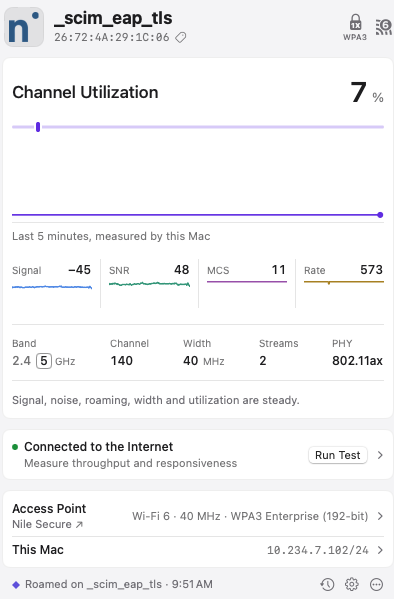
I can click on different sections to replace the view towards the top and take a look at the time line.
I like the internet connectivity check and showing me when there is no internet.
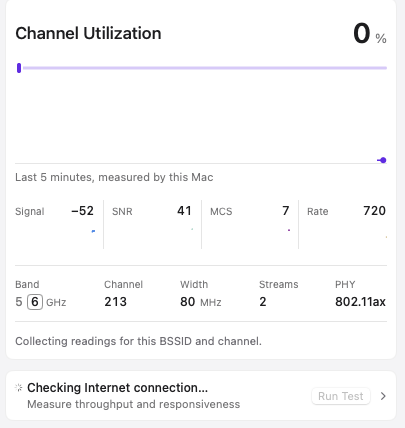

There is a Run test button which will do a quick speed test and it shows you the channel utilization going on when running a speed test. When not running a speed test, this can be a quick way to check the channel utilization on the channel your WLAN NIC is connected to.
I absolutely love the updated logging (I will get more into it) but this log shows details on when the Internet stopped working.
- Which SSID I was connected to
- Channel
- Frequency
- BSSID
- Timestamp
- Signal

Access Point:
Next section is about Access Point details. Lots of good information in here. This information can be pulled using Wi-Fi Explorer Pro for multiple networks, but if I am focusing on just one network and want to quick take a look, it is available right there on my top bar.

This Mac:
I can get information about the device, IP Network, MAC, channels and frequencies supported.


History:
I really love the updated history of events. More visual and you can export it to a csv file if you want.
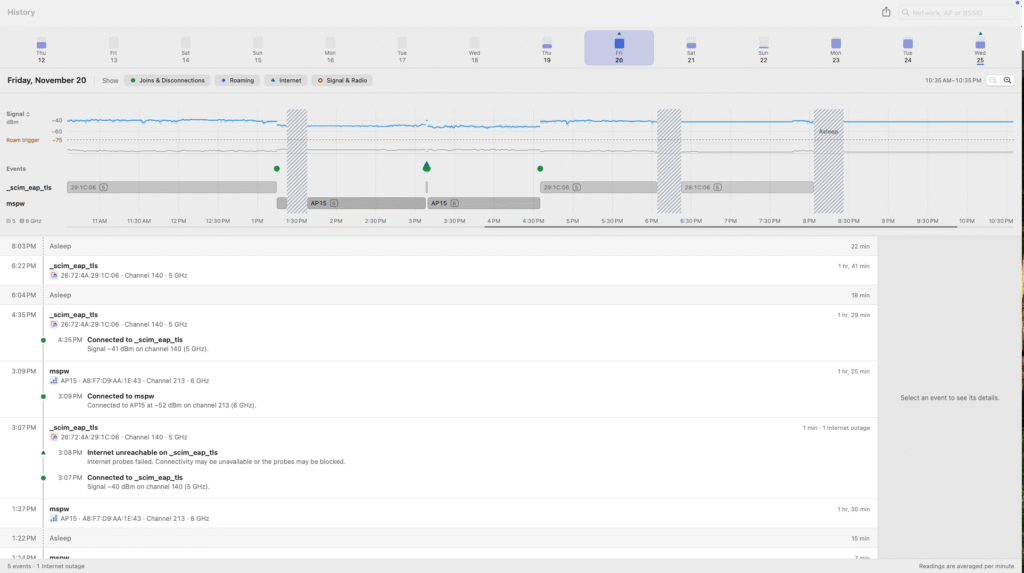
Time stamped roaming history, I had to run up and down a few times to generate these logs. This shows really good information about the wireless but also my client. What was my signal before and after. I was using Macbook Pro, on average I noticed roaming kicked in around -74 – 76 dBm.
This can come really handy when looking into/troubleshooting roaming issues or even validating a wireless network (NOTE: This of course applies to different models of Mac laptops that support this app).


This top area allows me to review all my events from the computer being asleep to any testing and roaming behavior. I can also zoom into a specific time frame to look at the events for analysis.
Summary:
Excellent update to Wi-Fi Signal Pro and worth every penny for commercial and even home users in my humble opinion. I have this app running on all my laptops, especially when I go onsite to do any Wi-Fi related work.