artofrf.com

Ali's Technology Blog

Menu
  • Home
  • Important Links
  • About Me
  • Tools and Scripts
Menu

Ekahau Survey Pro – Renaming Predictive Access points – Wish list Part 2

Posted on January 27, 2020February 6, 2020 by mali

I have done a whole bunch of predictive surveys on Ekahau and with the latest application update when I am doing a predictive survey I noticed that access point names are showing up as “Simulated AP1”, “Simulated AP2” and so on as shown below:

Simulated Access Points in Ekahau Survey Pro

Now this is great, however, when I go and look at them on the map these names can get confusing when all I want to see is are the numbers I don’t need to see “Simulated” in there.

Simulated Access Points on the Map

This can get pretty messy if the map/floor plan has more access points and it is large. In my case I started to rename them on the left and started to delete the word “Simulated”. And the difference is below. It is a little bit clear. I can actually remove the “AP-” from it and make it even clearer if I like but I decided not to do that in this case.

Simulated Access Points – Updated

I am certain there can be multiple use case scenarios to rename the access points. Renaming them one by one is not very practical especially if you have 20, 30, 40 … 100+ and so on access points. Ekahau allows you to bulk rename them by selecting multiple access points, which is a great feature.

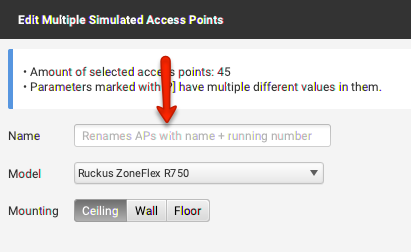
Bulk Rename Access Points

After I entered “AP” and then “Ok” it renamed all my access points with “AP – #”. This is great however this added space before and after “-“.

Simulated Access Point Renamed

I would like to mention couple of things here, 1) I do not want the space before and after the “-“, 2) I want the access points to be numbered with a single or double “0’s” in there like “AP01”, “AP001” or “AP-01”, “AP-001” etc. So it would be awesome if this feature can be updated so that we are able to rename the access points based on our need and it is not restricted.

In short I would like to be able to specify parameters with some variables and have the software rename access points using those parameters. So for example something like:

AP-0% = AP-01, AP-02, AP-03 and so on
AP-00% = AP-001, AP-002, AP-003 ... AP-010, AP-011 and so on

NOTE: If there is a way to do this from within the software and I may have missed it please feel free to leave a comment and I’ll update this. Thanks for reading.

Category: Ekahau, WLAN Tools

2 thoughts on “Ekahau Survey Pro – Renaming Predictive Access points – Wish list Part 2”

  1. Peter Widdicombe says:
    March 24, 2020 at 10:11 pm

    +1 for this one.

    Actually, I’d like a “global rename function” primarily for the purposes of printing or generating a report. Corporate standards may have a longer name that is used; and for a given site survey will have that common on all AP’s. For report or export map, I’d like to be able to replace or simply drop the first 5 or so characters on each AP, so when they happen to be near each other they don’t overwrite the names.

    … or to be able to adjust the font size for AP’s on reports/extracts?

    Reply
    1. mali says:
      March 25, 2020 at 5:47 pm

      Thank you Peter.

      Just to clarify you mean if the AP name is something like “SITE-RM111-R2-D2-AP01”, you want to to specify from the left how many characters can be dropped so for example you can specify -5 and the above will become “RM111-R2-D2-AP01” and so on?

      Thank you.

      Reply

Leave a Reply Cancel reply

Your email address will not be published. Required fields are marked *

This site uses Akismet to reduce spam. Learn how your comment data is processed.

Recent Posts

  • Nile Secure Guest – Configuration and Use Case
  • WLAN Pros Toolbox
  • Nile does NAC – Configuring Trust Engine
  • WLAN Validator
  • PCAP I/O Graph Analyzer

Tags

AirDrop arista Arista AGNI Arista CV-CUE Arista NAC Arista WIPS Arista WPA3 UPSK Aruba Central Automating Mist Switch Templates Automation AWDL Configuring Switch Templates in Mist CWAP 403 EAP Format MAC Addresses Hamina Network Planner Juniper SRX300 MacBook Marvis mdns MFD8 MFD9 Mist Access Assurance MistAI Mist Auto Placement Mist MPSK Mist Wireless NaaS Networking Field Day NFD32 NileNav Nile Secure Nile Wi-Fi Social Channels Tech Field Day Troubleshooting with Marvis Troubleshooting with Mist Troubleshooting with Mist AI Troubleshooting with Wireshark Wireless Adjuster Wireless Adjuster Level II Wireless troubleshooting WLPC wlpc2023 Wyebot

Tech Blogs

  • WiFiTodd
  • CCNA Wireless
  • Cisco Full Bars
  • Packet Life
  • Havilandweb
  • Gjermund Raaen
  • Bad-Fi
  • The ASCII Construct
  • Juniper Port Checker
  • WiFrizzy
  • Spectrum Chart
  • BadgerWiFi

Recent Comments

  • Hiten Thakkar on PCAP I/O Graph Analyzer
  • mali on Deploying Nile Secure – My First NSB
  • Larry Farrish on Deploying Nile Secure – My First NSB
  • Courtney on Mist Access Point – CSV
  • ayoub chabrouk on Ubiquiti stealing the show at MFD11

Archives

  • August 2026
  • July 2026
  • March 2026
  • February 2026
  • December 2025
  • November 2025
  • October 2025
  • August 2025
  • May 2025
  • January 2025
  • December 2024
  • November 2024
  • October 2024
  • September 2024
  • August 2024
  • July 2024
  • May 2024
  • April 2024
  • March 2024
  • February 2024
  • January 2024
  • December 2023
  • September 2023
  • August 2023
  • June 2023
  • May 2023
  • April 2023
  • February 2023
  • November 2022
  • October 2022
  • August 2022
  • July 2022
  • June 2022
  • May 2022
  • April 2022
  • March 2022
  • February 2022
  • January 2022
  • December 2021
  • November 2021
  • October 2021
  • September 2021
  • August 2021
  • July 2021
  • May 2021
  • April 2021
  • March 2021
  • July 2020
  • June 2020
  • May 2020
  • April 2020
  • March 2020
  • February 2020
  • January 2020
  • December 2019
  • November 2019
  • October 2019
  • September 2019
  • August 2019
  • July 2019
  • June 2019
  • April 2019
  • March 2019
  • November 2018
  • October 2018
  • September 2018
  • May 2018
  • January 2018
  • December 2017
  • August 2017
  • January 2017
  • September 2014
  • December 2013
  • October 2013
  • May 2013
  • August 2012
  • July 2012

Meta

  • Log in
  • Entries feed
  • Comments feed
  • WordPress.org

Categories

  • AeroHive
  • Arista
  • Arista
  • Aruba
  • Aruba
  • Aruba Central
  • BYoD
  • Certifications
  • Cisco
  • Cisco
  • Cisco EEM Scripting
  • Cisco Routing
  • Cisco Security
  • Cisco VoIP
  • Cisco VPN
  • Cisco Wireless
  • Conferences and Meetings
  • Design
  • Ekahau
  • General
  • Hamina
  • IoT, IIoT, OT
  • Juniper Security
  • Juniper Switching
  • Juniper/Mist
  • Linux
  • Microsoft
  • Mist
  • Mist Wireless
  • Nile
  • Nile Secure
  • Nile Wi-Fi
  • Programming/Automation
  • Python
  • Ruckus
  • Ruckus Wireless
  • Ruckus/Brocade
  • Ruckus/Brocade Scripting
  • Ruckus/Brocade Switching
  • Secure Guest Service
  • Security
  • Switching
  • Tools
  • Troubleshooting
  • Trust Engine
  • Uncategorized
  • Windows
  • Wireless
  • Wireless
  • WLAN Tools
© 2026 artofrf.com | Powered by Minimalist Blog WordPress Theme