
Marvis has been leading the AI innovation from Juniper Mist for a while. Lot of SLEs, insights and other data in the Mist dashboard is based on the real time information from the client devices and their performance. What if there are no client devices currently on the network? Or there is a need to run on demand testing. At times overlay sensors are users to do some synthetic testing that will test things like DHCP, DNS, Applications, performance etc.
Marvis Minis:
Juniper Mist announced Marvis Minis earlier this year that brings some of those features to the Mist Platform. If you have Marvis, once GA, Marvis Minis will be available with the required firmware.
I won’t go much more into it because there’s been some other really good articles on Marvis Minis and the links above will tell you some more about the technology behind it. I want to go over the troubleshooting aspect of Marvis Minis and how they can be useful. Previously, I have written a few posts about, “Troubleshooting with Marvis”. Time for some, “Troubleshooting with Marvis Minis”.
Application Troubleshooting:
While doing a demo recently and going over Marvis Minis, I was able to show the DNS, DHCP errors and the pcaps, however, I did not have anything under the Applications. I needed to generate some errors there so I added a custom URL.

I waiting a few min and did not see anything come up so I generated some traffic by simply trying to go to that website, and the next test run showed the error; since I specified VLAN30 for it, it tested it under VLAN30.

This confirmed pcaps with the Application Failure; let’s take a look at what the pcap looks like when there is an application related failure.
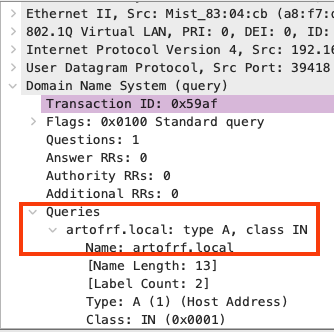
Here is the DNS portion showing the test trying to resolve the website.

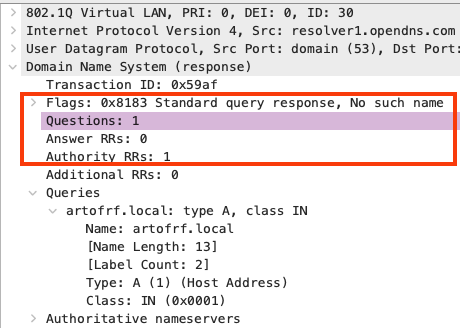
Here is the response back, showing that DNS was not able to resolve that address.
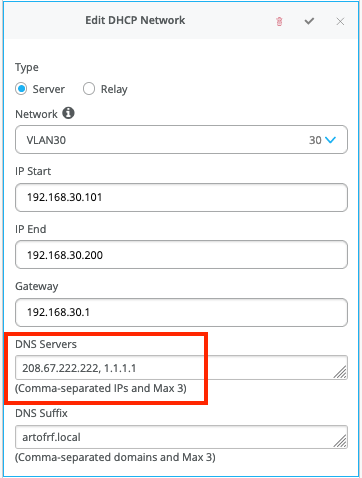
Note that the tests will use the DNS servers that are being assigned by the DHCP server.
Final Thoughts:
I am glad that Juniper Mist added this feature as it can provide even more troubleshooting data and proactive approach when monitoring and operating a network. I like that the tests are run randomly based on the data that is passing through the network. For example I noticed that the tests are run on the most used applications mostly. Here is a quick video overview on Marvis Minis.
These tests also don’t run every 5 min or 10 min on every single Access Point, there is some logic behind them which will most likely release later on once it is GA. But the question may come up, will they reduce the performance of my network and disrupt traffic?
Answer is no, because if the AP has bunch of clients and it is actively serving clients, AI will consider different factors and not run the Marvis Minis test on every single access point, especially if it is actively serving bunch of clients.
I would love to see few more features added to this as this product evolves:
- RADIUS testing (Automated and on demand).
- Ability to run a test from a specific AP or a switch.
- Ability to run a test on all access points on demand.
- I see many other scenarios and use cases on how this can evolve and benefit the Help Desk, NoC, Engineering teams etc.
If you are testing and/or running Marvis Minis in your environment currently would love to get your thoughts.
Amazing blog!!! Why no subscription option? I promise to subscribe personally 3 times 🙂