artofrf.com

Ali's Technology Blog

Menu
  • Home
  • Important Links
  • About Me
  • Tools and Scripts
Menu

Nile Portal and Wireless SSO with Okta

Posted on May 8, 2025May 8, 2025 by mali

I have written about setting up SSO using Okta to access Nile Portal and Wi-Fi access using SSO using Okta. With this setup I ran into a scenario with Two Factor Authentication, where Wireless users were having to go through the Two Factor Authentication as well since that was the default setting in Okta.

While this scenario works, it can be bit challenging for the wireless users trying to authenticate via SSO. I can disable it, but it will also disable the Two Factor Authentication when someone wants to access the Nile Portal as well. This can easily be fixed by creating a separate group for the wireless access.

Okta Configuration:

Directory/Groups:

Under Directory –> Groups, create a new Group and call it something like WLANAccess or Wi-FiAccess.

Next under the Group add the people that belong to this group and will be accessing the WLAN.

Under Applications, add the Nile app (Note: it worked without this step but I went ahead and added the app to keep it consistent).

Security/Authentication Policies:

My default policy under Authentication Policies is doing Two Factor Authentication. I created another policy for the Wireless Access.

First I added a new policy, call it something that will make sense. I named it WLANAccess

Open the policy and add the Nile App. NOTE: You can’t assign an app to two different Authentication Policies. So as soon as I assign the Nile App to this policy, it will remove it from the Default Policy and the Portal login will default to Two Factor Authentication any ways.

Under Rules, create a new rule to override the default Rule and use only the Password, do not use/choose Additional Factor Types.

Okta new Rule/Authentication Policies

Now when the Admins try to log into the Nile Portal, they will use the default policy and go through the Two Factor Authentication. All the users accessing Wi-Fi will only have to specify their username and password.

You can easily test this by forcing an existing connected user to go through the authentication process from the Nile Portal.
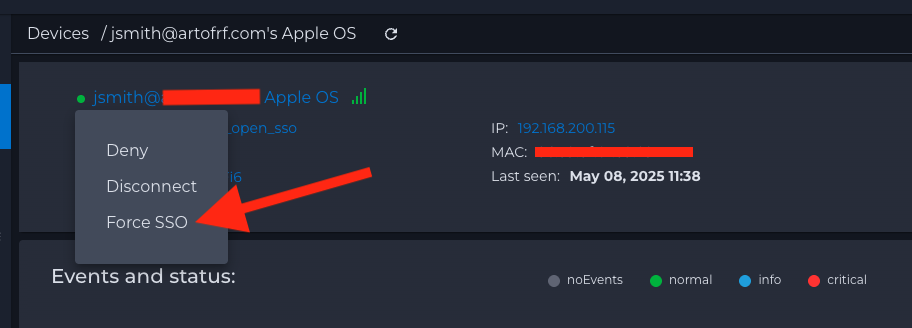
Nile Portal – Force SSO on a wireless client

NOTE: I could have also simply updated my default policy and added a rule for WLANAccess, but I decided to separate it from the default rule. Some of the flow will depend on different organizational requirements. Different ways to configure this, but this shows a general process of splitting the authentication methods.

Feel free to leave your feedback, hope this will be helpful.

Category: Nile Secure, Nile Wi-Fi, Security

Leave a Reply Cancel reply

Your email address will not be published. Required fields are marked *

This site uses Akismet to reduce spam. Learn how your comment data is processed.

Recent Posts

  • Nile Secure Guest – Configuration and Use Case
  • WLAN Pros Toolbox
  • Nile does NAC – Configuring Trust Engine
  • WLAN Validator
  • PCAP I/O Graph Analyzer

Tags

AirDrop arista Arista AGNI Arista CV-CUE Arista NAC Arista WIPS Arista WPA3 UPSK Aruba Central Automating Mist Switch Templates Automation AWDL Configuring Switch Templates in Mist CWAP 403 EAP Format MAC Addresses Hamina Network Planner Juniper SRX300 MacBook Marvis mdns MFD8 MFD9 Mist Access Assurance MistAI Mist Auto Placement Mist MPSK Mist Wireless NaaS Networking Field Day NFD32 NileNav Nile Secure Nile Wi-Fi Social Channels Tech Field Day Troubleshooting with Marvis Troubleshooting with Mist Troubleshooting with Mist AI Troubleshooting with Wireshark Wireless Adjuster Wireless Adjuster Level II Wireless troubleshooting WLPC wlpc2023 Wyebot

Tech Blogs

  • WiFiTodd
  • CCNA Wireless
  • Cisco Full Bars
  • Packet Life
  • Havilandweb
  • Gjermund Raaen
  • Bad-Fi
  • The ASCII Construct
  • Juniper Port Checker
  • WiFrizzy
  • Spectrum Chart
  • BadgerWiFi

Recent Comments

  • Hiten Thakkar on PCAP I/O Graph Analyzer
  • mali on Deploying Nile Secure – My First NSB
  • Larry Farrish on Deploying Nile Secure – My First NSB
  • Courtney on Mist Access Point – CSV
  • ayoub chabrouk on Ubiquiti stealing the show at MFD11

Archives

  • August 2026
  • July 2026
  • March 2026
  • February 2026
  • December 2025
  • November 2025
  • October 2025
  • August 2025
  • May 2025
  • January 2025
  • December 2024
  • November 2024
  • October 2024
  • September 2024
  • August 2024
  • July 2024
  • May 2024
  • April 2024
  • March 2024
  • February 2024
  • January 2024
  • December 2023
  • September 2023
  • August 2023
  • June 2023
  • May 2023
  • April 2023
  • February 2023
  • November 2022
  • October 2022
  • August 2022
  • July 2022
  • June 2022
  • May 2022
  • April 2022
  • March 2022
  • February 2022
  • January 2022
  • December 2021
  • November 2021
  • October 2021
  • September 2021
  • August 2021
  • July 2021
  • May 2021
  • April 2021
  • March 2021
  • July 2020
  • June 2020
  • May 2020
  • April 2020
  • March 2020
  • February 2020
  • January 2020
  • December 2019
  • November 2019
  • October 2019
  • September 2019
  • August 2019
  • July 2019
  • June 2019
  • April 2019
  • March 2019
  • November 2018
  • October 2018
  • September 2018
  • May 2018
  • January 2018
  • December 2017
  • August 2017
  • January 2017
  • September 2014
  • December 2013
  • October 2013
  • May 2013
  • August 2012
  • July 2012

Meta

  • Log in
  • Entries feed
  • Comments feed
  • WordPress.org

Categories

  • AeroHive
  • Arista
  • Arista
  • Aruba
  • Aruba
  • Aruba Central
  • BYoD
  • Certifications
  • Cisco
  • Cisco
  • Cisco EEM Scripting
  • Cisco Routing
  • Cisco Security
  • Cisco VoIP
  • Cisco VPN
  • Cisco Wireless
  • Conferences and Meetings
  • Design
  • Ekahau
  • General
  • Hamina
  • IoT, IIoT, OT
  • Juniper Security
  • Juniper Switching
  • Juniper/Mist
  • Linux
  • Microsoft
  • Mist
  • Mist Wireless
  • Nile
  • Nile Secure
  • Nile Wi-Fi
  • Programming/Automation
  • Python
  • Ruckus
  • Ruckus Wireless
  • Ruckus/Brocade
  • Ruckus/Brocade Scripting
  • Ruckus/Brocade Switching
  • Secure Guest Service
  • Security
  • Switching
  • Tools
  • Troubleshooting
  • Trust Engine
  • Uncategorized
  • Windows
  • Wireless
  • Wireless
  • WLAN Tools
© 2026 artofrf.com | Powered by Minimalist Blog WordPress Theme