artofrf.com

Ali's Technology Blog

Menu
  • Home
  • Important Links
  • About Me
  • Tools and Scripts
Menu

CWSP-205 – 802.11 Association

Posted on September 17, 2019December 18, 2019 by mali

I have previously discussed machine state and 4 Way Authentication briefly, here I want to discuss Open System Authentication specifically 802.11 Association. Before an RSNA is established between two devices they have to first go through Open System Authentication. STA must be Associated and Authenticated to the device.

As shown in the picture below following events happen when a client starts the connection process in Open System Authentication:

Probe Request – Client sends out its capabilities, uses the lowest data rate that the protocol allows, sends it at highest power.
Probe Response – This comes from the access point advertising its parameters for a given SSID. It uses the lowest mandatory basic data rate as shown, 12 Mbps in this case. Figure above also shows the RSN IE parameters that the device must support for the 802.11 association to complete successfully
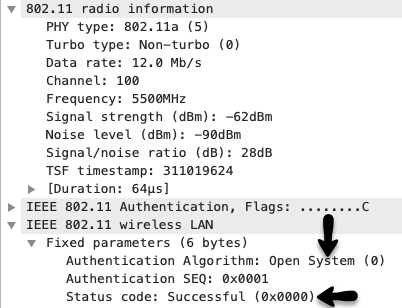
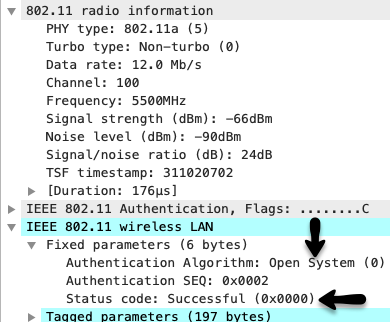
Authentication – These are two frames that are almost like two people meeting each other and saying hello to each other and shaking hands. Unlike WEP there is no actual encryption or secure credential exchange here and status code is usually always Successful.
Association Request – This frame comes from the client device and in this frame it actually syncs its WLAN NIC with the parameters sent by the access point in Probe Response. You can see that this time it is sent out at mandatory lowest basic data rate that was in the Probe Response and all supported rates, RSN IE etc are now synced with the Probe Response parameters.
Association Response – This frame is from the access point back to the client, if all parameter match then the Status Code is Successful. One key IE in here is the Association ID that gets assigned to each successfully associated device and is included in the TIM (Traffic Indication Map) of a Beacon Frame. PS-Poll uses this ID for frame delivery and NDPA also uses AID for beam forming.

Finally the station is associated and Open System Authentication is complete. If there is an issue with any capabilities not matching then this association would not complete. Quick example would be clients that only support WPA/TKIP but the access point parameters are WPA2/AES. In this case RSN IE capabilities will not match and the Association will not complete successfully.

Category: Certifications, Wireless

1 thought on “CWSP-205 – 802.11 Association”

  1. Pingback: Chromebook connectivity issues – artofrf.com

Leave a Reply Cancel reply

Your email address will not be published. Required fields are marked *

This site uses Akismet to reduce spam. Learn how your comment data is processed.

Recent Posts

  • CLI to UI – Nile Guest APIs
  • Nile Secure Guest – Configuration and Use Case
  • WLAN Pros Toolbox
  • Nile does NAC – Configuring Trust Engine
  • WLAN Validator

Tags

#MFD9 - Juniper Presents AP W318 arista Arista AGNI Arista CV-CUE Arista Hospitality AP Arista NAC Arista presents at MFD9 Arista wall plate AP Arista WIPS Arista WPA3 UPSK Aruba Central Automation CWAP 403 EAP Format MAC Addresses Hamina Network Planner Juniper Mist show cloud-native NAC Juniper SRX300 Marvis MFD8 MFD9 MistAI Mist MPSK Mist Premium Analytics Mist Wireless NaaS Networking Field Day NFD32 Nile APIs NileNav Nile Secure Nile Wi-Fi Tech Field Day Troubleshooting with Marvis Troubleshooting with Mist Troubleshooting with Mist AI Troubleshooting with Wireshark True NaaS Wireless Adjuster Wireless Adjuster Level II Wireless troubleshooting WLPC wlpc2023 Wyebot

Tech Blogs

  • CCNA Wireless
  • Cisco Full Bars
  • Packet Life
  • The ASCII Construct
  • Juniper Port Checker
  • Bad-Fi
  • Gjermund Raaen
  • Havilandweb
  • WiFiTodd
  • BadgerWiFi
  • WiFrizzy
  • Spectrum Chart

Recent Comments

  • Hiten Thakkar on PCAP I/O Graph Analyzer
  • mali on Deploying Nile Secure – My First NSB
  • Larry Farrish on Deploying Nile Secure – My First NSB
  • Courtney on Mist Access Point – CSV
  • ayoub chabrouk on Ubiquiti stealing the show at MFD11

Archives

  • August 2026
  • July 2026
  • March 2026
  • February 2026
  • December 2025
  • November 2025
  • October 2025
  • August 2025
  • May 2025
  • January 2025
  • December 2024
  • November 2024
  • October 2024
  • September 2024
  • August 2024
  • July 2024
  • May 2024
  • April 2024
  • March 2024
  • February 2024
  • January 2024
  • December 2023
  • September 2023
  • August 2023
  • June 2023
  • May 2023
  • April 2023
  • February 2023
  • November 2022
  • October 2022
  • August 2022
  • July 2022
  • June 2022
  • May 2022
  • April 2022
  • March 2022
  • February 2022
  • January 2022
  • December 2021
  • November 2021
  • October 2021
  • September 2021
  • August 2021
  • July 2021
  • May 2021
  • April 2021
  • March 2021
  • July 2020
  • June 2020
  • May 2020
  • April 2020
  • March 2020
  • February 2020
  • January 2020
  • December 2019
  • November 2019
  • October 2019
  • September 2019
  • August 2019
  • July 2019
  • June 2019
  • April 2019
  • March 2019
  • November 2018
  • October 2018
  • September 2018
  • May 2018
  • January 2018
  • December 2017
  • August 2017
  • January 2017
  • September 2014
  • December 2013
  • October 2013
  • May 2013
  • August 2012
  • July 2012

Meta

  • Log in
  • Entries feed
  • Comments feed
  • WordPress.org

Categories

  • AeroHive
  • Arista
  • Arista
  • Aruba
  • Aruba
  • Aruba Central
  • BYoD
  • Certifications
  • Cisco
  • Cisco
  • Cisco EEM Scripting
  • Cisco Routing
  • Cisco Security
  • Cisco VoIP
  • Cisco VPN
  • Cisco Wireless
  • Conferences and Meetings
  • Design
  • Ekahau
  • General
  • Hamina
  • IoT, IIoT, OT
  • Juniper Security
  • Juniper Switching
  • Juniper/Mist
  • Linux
  • Microsoft
  • Mist
  • Mist Wireless
  • Nile
  • Nile Secure
  • Nile Wi-Fi
  • Programming/Automation
  • Python
  • Ruckus
  • Ruckus Wireless
  • Ruckus/Brocade
  • Ruckus/Brocade Scripting
  • Ruckus/Brocade Switching
  • Secure Guest Service
  • Security
  • Switching
  • Tools
  • Troubleshooting
  • Trust Engine
  • Uncategorized
  • Windows
  • Wireless
  • Wireless
  • WLAN Tools
© 2026 artofrf.com | Powered by Minimalist Blog WordPress Theme