artofrf.com

Ali's Technology Blog

Menu
  • Home
  • Important Links
  • About Me
  • Tools and Scripts
Menu

Chromebook connectivity issues

Posted on September 19, 2019March 4, 2022 by mali

I came across a recent issue related to Chromebooks. A particular site with about 200 plus Windows, Apple, Android devices working perfectly fine with no issues. They also had 30 Chromebooks, which constantly had connectivity issues no matter where they were in the building. Looking through the configurations of the Wi-Fi, I noticed nothing that may have been causing an issue. 200+ of other devices were working perfectly fine. Looking at the ChromeOS they were using M74. I started looking at the connectivity and compared different clients connected to the access points. I noticed that while all the other clients were showing up connected at the lowest mandatory basic rate of 12 Mbps, these Chromebooks were shown up at 6 Mbps (while idle).

This behavior did not seem right, so I did some testing with the Chromebooks.

Probe Request from Chromebook – So this looks normal Chromebook is sending a normal Probe Request with the lowest data rate that the PHY allows it. No issues here.
Probe Response from the AP – This looks normal as well showing the lowest mandatory data rate and all the supported data rates as well as rest the capability parameters
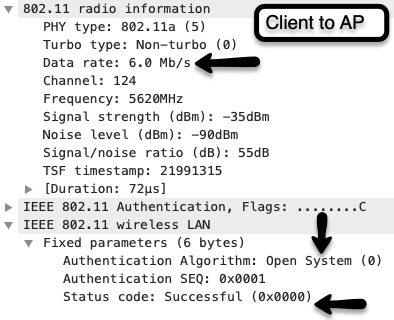
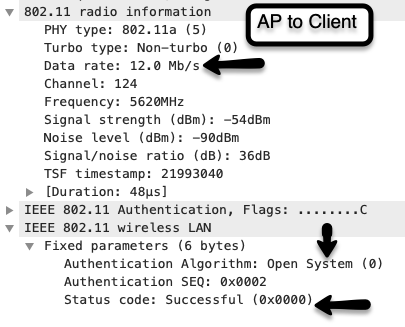
Authentication – Now this is where it got interesting, first pictures shows the initial authentication frame from the Chromebook to the AP and if you look at the data rate it is set at 6 Mbps. Now from my previous post about 802.11 association we can see that this should have been at the lowest mandatory data rate that is in the Probe Response in this case it should have bee 12 Mbps vs 6 Mbps. However Status code is successful still. Let’s move to the next frame.
Association Request from Chromebook – From previous blog entry on 802.11 association we know that this frame is when the client syncs its WLAN NIC with the parameters sent by the access point. However, in this case it seems client is trying to associate at 6 Mbps when it should have been at 12 Mbps, it does show 12 Mbps as part of the supported rates but comparing this frame with working devices 12 and 24 Mbps rates are in ( ) but they are not in this Association Request frame sent out by the Chromebook.
Association Response – Before the conclusion let’s take a look at the Association Response frame. This frame clearly shows that the Association response is successful and client has also received an Association ID (AID) as well. Looking at the data rate again it is clear that the rate here is 12 Mbps vs 6 Mbps, which was used by the Chromebook in Association Request.

Looking through all these frames, testing and finding out the same behavior even in 2.4 GHz band here were some of my thoughts:

  • During the Association Request phase when the WLAN NIC should be syncing with the parameters sent by the access point, data rate is not syncing. Client device is using the lowest rate allowed by the PHY instead of syncing that with the 12 Mbps required by the access point.
  • 802.11-2016 standards document 10.7 discusses Multirate support. Specifically 10.7.1 states, “IEEE 802.11(TM) Wireless – Only the data transfer rates of the mandatory rate set of the attached PHY are guaranteed to be supported when a STA for which dot11OCBActivated is true transmits a Management or Data frame. A higher layer protocol entity within a STA in which dot11OCBActivated is true might negotiate a rate outside the mandatory rate set.”
  • Next 802.11-2016 standards document 10.7.5.7 clause mentions, “IEEE 802.11(TM) Wireless – A STA shall not transmit a frame using a rate or MCS that is not supported by the receiver STA or STAs, as reported in any Supported Rates and BSS Membership Selectors element, Extended Supported Rates and BSS Membership Selectors element, or Supported MCS Set field in Management frames transmitted by the receiver STA.”
  • Based on these findings although most of the parameters are matching in the Association Request frame however clients were clearly violating the above mentioned clauses from the 802.11-2016 standard. Which leads me to believe was part of their connectivity issue.
  • I still do not completely understand however why the Association Response was successful, technically it should not have been successful based on the standard, if anyone has any further thoughts and explanation on that I would love to discuss/hear it.

Doing some research online I did find some enterprise cases filed with Chromium.org specifically 953702. It seems like they did fix the issue with the client using the lowest rate supported by the PHY in M77. I tested couple of Chromebooks to M77 and M78 rested the scenario and this time I was not seeing the same issue. Association Request data rate was matching the data rate specified in the Probe Response as shown

This is an Association Request frame from Chromebook on M78. As compared to M74 it is clear that this is syncing the data rate of 12 Mbps with the parameters send by the AP in Probe Response. This also stabilized the client connectivity after updating all 30 Chromebooks to M77 or higher code.
Category: Troubleshooting, Wireless

1 thought on “Chromebook connectivity issues”

  1. Pingback: Wyebot – Wireless Intelligence Platform™(WIP) – artofrf.com

Leave a Reply Cancel reply

Your email address will not be published. Required fields are marked *

This site uses Akismet to reduce spam. Learn how your comment data is processed.

Recent Posts

  • CLI to UI – Nile Guest APIs
  • Nile Secure Guest – Configuration and Use Case
  • WLAN Pros Toolbox
  • Nile does NAC – Configuring Trust Engine
  • WLAN Validator

Tags

#MFD9 - Juniper Presents AP W318 arista Arista AGNI Arista CV-CUE Arista Hospitality AP Arista NAC Arista presents at MFD9 Arista wall plate AP Arista WIPS Arista WPA3 UPSK Aruba Central Automation CWAP 403 EAP Format MAC Addresses Hamina Network Planner Juniper Mist show cloud-native NAC Juniper SRX300 Marvis MFD8 MFD9 MistAI Mist MPSK Mist Premium Analytics Mist Wireless NaaS Networking Field Day NFD32 Nile APIs NileNav Nile Secure Nile Wi-Fi Tech Field Day Troubleshooting with Marvis Troubleshooting with Mist Troubleshooting with Mist AI Troubleshooting with Wireshark True NaaS Wireless Adjuster Wireless Adjuster Level II Wireless troubleshooting WLPC wlpc2023 Wyebot

Tech Blogs

  • CCNA Wireless
  • Cisco Full Bars
  • Packet Life
  • The ASCII Construct
  • Juniper Port Checker
  • Bad-Fi
  • Gjermund Raaen
  • Havilandweb
  • WiFiTodd
  • BadgerWiFi
  • WiFrizzy
  • Spectrum Chart

Recent Comments

  • Hiten Thakkar on PCAP I/O Graph Analyzer
  • mali on Deploying Nile Secure – My First NSB
  • Larry Farrish on Deploying Nile Secure – My First NSB
  • Courtney on Mist Access Point – CSV
  • ayoub chabrouk on Ubiquiti stealing the show at MFD11

Archives

  • August 2026
  • July 2026
  • March 2026
  • February 2026
  • December 2025
  • November 2025
  • October 2025
  • August 2025
  • May 2025
  • January 2025
  • December 2024
  • November 2024
  • October 2024
  • September 2024
  • August 2024
  • July 2024
  • May 2024
  • April 2024
  • March 2024
  • February 2024
  • January 2024
  • December 2023
  • September 2023
  • August 2023
  • June 2023
  • May 2023
  • April 2023
  • February 2023
  • November 2022
  • October 2022
  • August 2022
  • July 2022
  • June 2022
  • May 2022
  • April 2022
  • March 2022
  • February 2022
  • January 2022
  • December 2021
  • November 2021
  • October 2021
  • September 2021
  • August 2021
  • July 2021
  • May 2021
  • April 2021
  • March 2021
  • July 2020
  • June 2020
  • May 2020
  • April 2020
  • March 2020
  • February 2020
  • January 2020
  • December 2019
  • November 2019
  • October 2019
  • September 2019
  • August 2019
  • July 2019
  • June 2019
  • April 2019
  • March 2019
  • November 2018
  • October 2018
  • September 2018
  • May 2018
  • January 2018
  • December 2017
  • August 2017
  • January 2017
  • September 2014
  • December 2013
  • October 2013
  • May 2013
  • August 2012
  • July 2012

Meta

  • Log in
  • Entries feed
  • Comments feed
  • WordPress.org

Categories

  • AeroHive
  • Arista
  • Arista
  • Aruba
  • Aruba
  • Aruba Central
  • BYoD
  • Certifications
  • Cisco
  • Cisco
  • Cisco EEM Scripting
  • Cisco Routing
  • Cisco Security
  • Cisco VoIP
  • Cisco VPN
  • Cisco Wireless
  • Conferences and Meetings
  • Design
  • Ekahau
  • General
  • Hamina
  • IoT, IIoT, OT
  • Juniper Security
  • Juniper Switching
  • Juniper/Mist
  • Linux
  • Microsoft
  • Mist
  • Mist Wireless
  • Nile
  • Nile Secure
  • Nile Wi-Fi
  • Programming/Automation
  • Python
  • Ruckus
  • Ruckus Wireless
  • Ruckus/Brocade
  • Ruckus/Brocade Scripting
  • Ruckus/Brocade Switching
  • Secure Guest Service
  • Security
  • Switching
  • Tools
  • Troubleshooting
  • Trust Engine
  • Uncategorized
  • Windows
  • Wireless
  • Wireless
  • WLAN Tools
© 2026 artofrf.com | Powered by Minimalist Blog WordPress Theme